
Clicking through a cloud console to set up a queue, a bucket and a few functions is fine once. Doing it again for staging, then production, then a new region, and keeping all of them identical as things change, quickly becomes slow and error-prone. Moving to the cloud and to serverless removes a lot of operational burden, but it doesn’t solve that problem by itself.
Infrastructure as Code (IaC) is the usual answer. You describe your infrastructure in files, and a tool turns those files into real resources. The benefits are significant:
Each major cloud provider has its own native IaC service:
| Cloud | Native IaC service |
|---|---|
| AWS | CloudFormation |
| Microsoft Azure | Resource Manager |
| Google Cloud | Cloud Deployment Manager |
These services are mostly declarative. You list resources and their settings in JSON or YAML, then submit the file, adjusting parameters for each environment. It works, but large YAML templates are verbose, difficult to reuse and offer no help from a compiler.
The AWS Cloud Development Kit (CDK) sits on top of CloudFormation rather than replacing it. Instead of writing templates, you describe your infrastructure in a general-purpose language such as TypeScript. When you deploy, CDK synthesizes that code into a CloudFormation template and CloudFormation does the provisioning.
Because you’re writing real code, you get loops, functions, classes and packages. That makes it possible to build reusable components and to describe a whole application’s infrastructure in very few lines.
The easiest way to picture a CDK app is as a tree. Each leaf is a low-level building block that maps to a single AWS resource. Moving up the tree, those blocks are grouped into larger units until the root represents the entire application. Thanks to these layers, complex infrastructure stays manageable, and anyone reading the code can follow how the system is assembled.
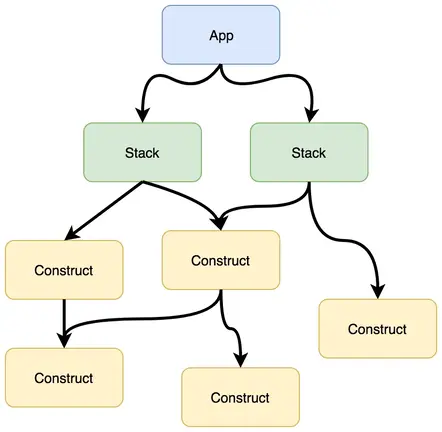
There are four concepts to understand: constructs, resources, stacks and the app. Let’s go from the bottom of the tree to the top.
A construct is the basic unit of a CDK application. Stacks and apps are themselves made from constructs. The AWS Construct Library provides constructs for AWS services such as S3 buckets, DynamoDB tables and AppSync APIs.
Constructs come in three levels of abstraction.
L1: a direct mirror of CloudFormation. L1 constructs are generated straight from the CloudFormation resource specification, so they support every property CloudFormation does. They also add nothing on top: whatever CloudFormation requires, you have to set yourself. They’re easy to recognise because their names always start with Cfn.
new CfnBucket(scope: Construct, id: string, props?: CfnBucketProps)
L2: sensible defaults and helper methods. L2 constructs are what you’ll use most of the time. They include reasonable defaults and convenience methods, so you write far less configuration. In the example below, a single method call per permission gives a Lambda function write access to a bucket, with no IAM policy written by hand.
    // L2 construct for an S3 bucket
    const bucket = new s3.Bucket(this, 'uploads-bucket');

    // L2 construct for a Lambda function
    const lambdaFunction = new lambda.Function(this, 'uploads-function', {
      // ...
    });

    // Helper methods generate the IAM permissions for us
    bucket.grantPut(lambdaFunction);
    bucket.grantPutAcl(lambdaFunction);
L3: complete patterns. L3 constructs, often called patterns, combine several resources into a common architecture. Here, a REST API in Amazon API Gateway is created and connected to a Lambda function with only a few lines:
// L2 construct for the Lambda function
const lambdaFunction = new lambda.Function(this, 'lambda-function', {
  runtime: lambda.Runtime.NODEJS_16_X,
  handler: 'main',
  code: lambda.Code.fromAsset(path.join(__dirname, '../src/handler')),
});

// L3 pattern: an API Gateway REST API that proxies to the function
const lambdaRestApi = new apigateway.LambdaRestApi(
  this,
  'lambda-rest-api',
  {
    handler: lambdaFunction,
  },
);
(If you copy this, use a current Lambda runtime. Node.js 16 has since been deprecated on Lambda.)
When you instantiate a construct, you’re declaring a real AWS resource that will exist after deployment. The object you get back exposes that resource’s attributes. For example, you can read an SQS queue’s URL from the object and pass it to anything else that needs it:
const queue = new sqs.Queue(this, 'MyQueue'); // declare the queue resource
const url = queue.queueUrl; // read an attribute from the deployed queue
Until deployment, attributes like queueUrl are tokens, placeholders that CloudFormation resolves to the real values during deployment. You can pass them around freely, but you can’t, for example, parse them as plain strings at synth time.
A stack is a group of resources that are deployed together. Each CDK stack becomes one CloudFormation stack, so it has the same capabilities and limits, including CloudFormation’s per-stack resource quota. At deploy time, CDK synthesizes every stack into its own CloudFormation template and sends it to AWS.
The App is a special construct that can only sit at the root of the tree. It takes no scope argument, because nothing sits above it. It holds any number of stacks and gives each one its initial scope. Each stack then passes that scope down to the constructs inside it, which is how the tree is built.
Reusable, opinionated building blocks. You can wrap the built-in constructs in your own constructs that enforce your organisation’s rules, such as mandatory tags, naming conventions or encryption settings. Publish them as a shared library and every team gets those rules without copying configuration around.
The full power of a programming language. CDK supports TypeScript, Python, Java, .NET and Go. That means type checking, validation logic, IDE refactoring and everything else you’re used to in application code. Many mistakes are caught when you compile, long before CloudFormation starts creating anything.
Confidence before you deploy. The CDK CLI can synthesize a template so you can inspect it, diff your proposed changes against what’s deployed, and ask you to approve security-sensitive changes such as new IAM permissions before applying them. Tooling like the AWS Toolkit for Visual Studio Code also lets you browse your app, stacks, resources and policies visually. All of this makes changing infrastructure much less nerve-racking.
Speed. Reusing constructs, writing in a language you already know instead of YAML, and getting IDE help all add up. Extensions such as CDK Snippets provide autocompletion and templates that make writing definitions even faster.
In short: write custom constructs to enforce your standards, and turn recurring setups into reusable patterns so you aren’t copying configuration. Publish shared constructs as versioned packages that every team can depend on. Treat your CDK code like any other codebase, applying your language’s usual conventions, linting and code review. Finally, write tests with the CDK assertions library so that a refactor can’t quietly change the infrastructure you deploy.
These come up a lot when teams start using CDK:
cdk bootstrap, which creates the resources CDK uses for deployments, such as the asset bucket and roles. Deployments fail without it.cdk diff before deploying a refactor.removalPolicy deliberately, especially in short-lived environments.Does CDK replace CloudFormation?
No. CDK generates CloudFormation templates, and CloudFormation still performs the deployment. You can open the generated template in cdk.out at any time.
Can I use a CloudFormation feature that has no L2 construct yet?
Yes. Use the L1 Cfn* construct directly, or use an escape hatch on an L2 construct to reach its underlying L1 resource and override properties.
Which language should I pick? Any supported language works. TypeScript is the language CDK itself is written in, so it usually has the most examples and the earliest access to new features.
cdk diff before every deployment, be careful about construct IDs, and write tests for your infrastructure code.