
If your pipeline deploys to AWS with an access key ID and secret saved in GitHub secrets, you’re carrying around a long-lived credential. Someone has to rotate it, and if it ever leaks, whoever finds it can use it. There’s a cleaner option: let GitHub prove who it is to AWS with OpenID Connect (OIDC), and let AWS give back credentials that expire when the job finishes. In this post I’ll walk through how that trust works and how to set it up on both sides.
GitHub Actions runs automated jobs in response to events in a repository. Its most common use is CI/CD, where it builds, tests and deploys every time code is pushed. It isn’t limited to pipelines, though. Teams also use it to tag releases, send notifications when issues are opened, migrate repositories and handle plenty of other chores.
For CI/CD in particular, I think it has a lot going for it:
Once a workflow is allowed to change things in your cloud account, though, the most important question is how much access it gets. The answer should be only what the deployment needs, and only for as long as the job runs. OIDC makes that easy to achieve.
The idea is a trust relationship. You tell AWS that it may accept identity tokens issued by GitHub, and you attach conditions to an IAM role that say which GitHub workflows may assume it. Those conditions are checked against claims inside the token. No AWS secret is ever stored in GitHub.
Here’s the flow for each job run:
repository, repository_owner and job_workflow_ref, and it’s presented to AWS.octo-org/octo-repo repository to assume the role, and nobody else:"Condition":
"StringLike": {
"token.actions.githubusercontent.com:sub": "repo:octo-org/octo-repo:*"
}
}
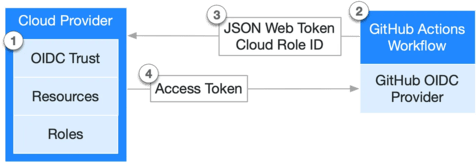
The pattern isn’t specific to AWS. Azure, Google Cloud and tools such as HashiCorp Vault accept GitHub’s OIDC tokens in the same way.
AWS needs two things: to know about GitHub as an identity provider, and a role that GitHub is allowed to assume.
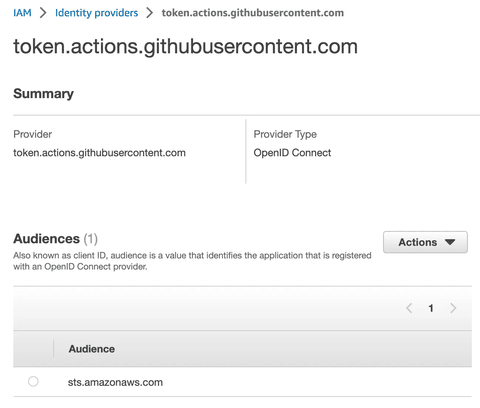
1. Register GitHub as an OIDC identity provider in IAM. Use https://token.actions.githubusercontent.com as the provider URL and sts.amazonaws.com as the audience.
2. Create the deployment role. Give it the permissions your deployment needs, as you would for any role. What’s different here is the trust relationship. That’s where you add conditions on the token’s claims so that only the repositories, branches or environments you choose can assume it. GitHub documents every claim you can use here.
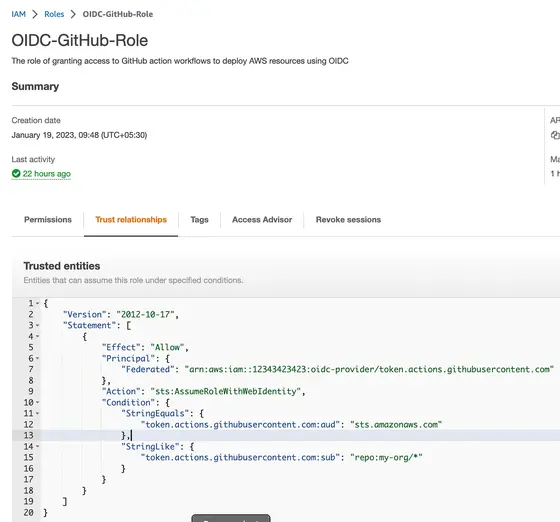
From now on, AWS will let a workflow assume this role, but only if it presents a valid GitHub token whose claims satisfy the trust policy.
Over in the workflow, AWS’s own configure-aws-credentials action takes care of swapping the OIDC token for AWS credentials. You tell it which role to assume, give the session a name and pick a region, and the steps after it can call AWS as usual.
The example below copies a file into an S3 bucket on every push. Two details matter. The id-token: write permission is what lets the job ask GitHub for a token at all. The configure-aws-credentials step is where the role ARN, session name and region are set:
name: AWS example workflow
on:
  push
env:
  BUCKET_NAME: "example-bucket-name"
  AWS_REGION: "us-east-1"
# permission can be added at job level or workflow level
permissions:
  id-token: write # This is required for requesting the JWT
  contents: read # This is required for actions/checkout
jobs:
  S3PackageUpload:
    runs-on: ubuntu-latest
    steps:
      - name: Git clone the repository
        uses: actions/checkout@v3
      - name: configure aws credentials
        uses: aws-actions/configure-aws-credentials@v1
        with:
          role-to-assume: arn:aws:iam::1234567890:role/example-role
          role-session-name: samplerolesession
          aws-region: ${{ env.AWS_REGION }}
      # Upload a file to AWS s3
      - name: Copy index.html to s3
        run: aws s3 cp ./index.html s3://${{ env.BUCKET_NAME }}/
Each time this workflow runs, the action presents GitHub’s OIDC token to AWS and gets back temporary credentials. Those credentials carry exactly the permissions of the requested role and nothing more.
| Static IAM user keys | OIDC federation | |
|---|---|---|
| Secret stored in GitHub | Yes, a long-lived key pair | None |
| Rotation | Manual and easy to forget | Not needed, because credentials expire with the job |
| Scope of access | Whatever the IAM user can do | A role you can limit to specific repos, branches or environments |
| Where access is managed | Spread across IAM users and repo secrets | In one place, through IAM roles and trust policies |
id-token: write. Without it the job can’t request an OIDC token, and the credentials step fails. If you set permissions explicitly, remember that any permission you don’t list is set to none.repo:my-org/* or a missing sub condition can let any repository in the org, or worse, assume your production role. Scope sub to specific repositories, and ideally to a branch (repo:org/repo:ref:refs/heads/main) or an environment (repo:org/repo:environment:prod).aud claim must match the audience you registered, sts.amazonaws.com for the official action. Check it in the trust policy too.@v1 as originally written. Newer major versions of configure-aws-credentials run on current Node.js runtimes and are worth upgrading to.Do I still need any AWS secrets in GitHub? No. The only thing the workflow needs is the role ARN, and that isn’t sensitive.
How long do the credentials last?
They last for the role session. By default that’s one hour, and you can change it with the action’s role-duration-seconds input, up to the role’s maximum session duration.
Can I use different roles for staging and production? Yes, and you should. Create one role per environment and limit each trust policy to the matching GitHub environment or branch.
Using OIDC between GitHub Actions and AWS means no long-lived keys to leak or rotate. Each job gets credentials that are scoped by an IAM trust policy and expire when the job ends. Setup takes one identity provider and one role in AWS, plus a single action in your workflow. If you’re still deploying with stored access keys, this is one of the easiest security wins available.