
Think about the last time you watched a chat thread update by itself, a multiplayer game sync a move, or a dashboard tick over without a refresh. None of that works well if the browser has to keep asking the server “anything new?”. What you want is a channel that stays open so either side can talk whenever it has something to say. WebSockets give you exactly that. On AWS, API Gateway can host that channel for you, so you don’t have to run your own socket servers.
In this post I’ll cover the building blocks of WebSocket APIs in Amazon API Gateway, then put them to work in a tiny messaging app defined with the AWS Cloud Development Kit (CDK) in TypeScript.
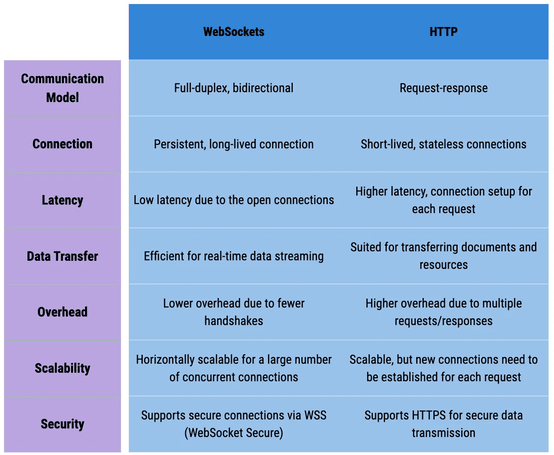
A WebSocket is a single, long-lived connection that carries traffic in both directions at the same time (full duplex). The client opens it once and keeps it. After that, the client and the server can each push messages whenever they like, and there’s no new handshake for every exchange. That’s why latency is so low.
HTTP is built the other way around. Each request opens a short exchange, the server answers, and that’s the end of it, with no state carried over. That model is fine for fetching resources. It’s awkward when the server needs to tell the client something it never asked for. Chat, live broadcasts and fast state synchronisation fit the persistent model much better.
Keeping connections open does give you some extra work, though. If you run a WebSocket backend yourself, you have to deal with:
| Concern | What you need to handle |
|---|---|
| Connection lifecycle | Tracking clients as they connect and drop off |
| Transport security | Keeping data encrypted and protected while in transit |
| Message routing | Sending each incoming message to the right piece of server-side logic |
| Observability | Watching connection health and performance, and spotting problems early |
Amazon API Gateway is a fully managed service for creating, publishing, securing and monitoring APIs at any scale. It’s best known for REST and HTTP APIs, but it also supports WebSocket APIs, and it takes care of most of the concerns in the table above. That leaves you to write the parts that are specific to your app. The main wins:
WebSocket APIs reuse familiar API Gateway ideas such as models, authorizers and stages. On top of those, a few WebSocket-specific concepts matter.
Routes play the role that endpoints play in a REST API. Each incoming JSON message is matched to a route, and the route forwards it to a backend integration. API Gateway gives you three reserved routes out of the box:
$connect fires when a client first opens the persistent connection.$disconnect fires when either the client or the server closes it.$default is the fallback. It catches messages whose route can’t be worked out or that don’t match any route, which makes it a good place to reject malformed input politely.Alongside these, you can define custom routes for your own features. Each one must be wired to an integration (a Lambda function, a DynamoDB table and so on) before it can do anything.
Every connected client gets a connection ID, and you need that ID to send a message to that client. API Gateway generates the IDs, but deciding what to do with them is up to you. A common pattern is to put a Lambda behind $connect that stores each new ID in a datastore. Later, you can loop over the stored IDs to broadcast. You’d then add matching cleanup logic behind $disconnect to delete the IDs that have gone away.
The protocol itself is bidirectional, but API Gateway lets you choose per route whether the client gets a reply. A one-way route processes the message and sends nothing back. A two-way route can return a response, for example an acknowledgement that processing has finished.
How does API Gateway know which route a message belongs to? It evaluates a route selection expression against every message. You set this expression when you create the API, so you need to agree on a message shape first. A simple convention is an action field that names the route:
{
   "action": "createTodo",
   "data": {
      "name": "Create WebSocket API",
      "completed": false
   }
}
For that shape, the expression is $request.body.action. $request.body points at the message payload, and you can point at any attribute in it that suits your design.
Now let’s apply those ideas. Using CDK with TypeScript, I’ll build the smallest useful WebSocket API I can think of. It logs connects and disconnects, and it has one custom route that lets one client send a message to another. The plan:
I’m creating the functions first so they’re ready to plug in when the API and its routes are defined. CDK’s NodejsFunction construct bundles the TypeScript handlers for us:
// Handles clients opening a connection
const wsConnectLambda = new NodejsFunction(this, 'ws-connect-lambda', {
      entry: join(__dirname, '../src/connect/index.ts'),
      handler: 'handler',
      functionName: 'connect-lambda',
      runtime: Runtime.NODEJS_18_X,
});

// Handles clients closing a connection
const wsDisconnectLambda = new NodejsFunction(
      this,
      'ws-disconnect-lambda',
      {
        entry: join(__dirname, '../src/disconnect/index.ts'),
        handler: 'handler',
        functionName: 'disconnect-lambda',
        runtime: Runtime.NODEJS_18_X,
      }
);

// Handles relaying a message to another connection
const sendMessageLambda = new NodejsFunction(this, 'send-message-lambda', {
      entry: join(__dirname, '../src/send-message/index.ts'),
      runtime: Runtime.NODEJS_18_X,
      functionName: 'send-message',
      handler: 'handler',
});
I’ve kept both lifecycle handlers deliberately bare. Each one just logs the connection ID, which is enough to watch clients come and go. In a real app, this is where you’d persist or remove IDs, check who the caller is, and so on.
On connect:
export const handler = async (event: APIGatewayProxyEvent) => {
  const connectionId = event.requestContext.connectionId;
  console.log('connection created:', connectionId);
  return { statusCode: 200, body: 'Connected.' };
};
On disconnect:
export const handler = async (event: APIGatewayProxyEvent) => {
  const connectionId = event.requestContext.connectionId;
  console.log('Disconnected:', connectionId);
  return { statusCode: 200, body: 'Disconnected.' };
};
This function does the interesting work: it relays a message to a different client. Clients call it with a payload like this:
{
   "action":"sendMessage",
   "connectionId":"<receiver's connection id>",
   "message":"<message content>"
}
Here, action is what the route selection expression reads, connectionId identifies the recipient, and message is the text to deliver.
The handler builds an API Gateway Management API client that points at the API’s own domain and stage. It pulls the recipient and the text out of the body and calls postToConnection:
export const handler = async (event: APIGatewayProxyEvent) => {
  const apigwManagementApi = new ApiGatewayManagementApi({
    apiVersion: '2018-11-29',
    endpoint:
      event.requestContext.domainName + '/' + event.requestContext.stage,
  });

  const eventBody = JSON.parse(event.body ?? '');
  const connectionId = eventBody.connectionId;
  const message = eventBody.message;

  console.log('Payload:', { ConnectionId: connectionId, Data: message });

  try {
    await apigwManagementApi
      .postToConnection({ ConnectionId: connectionId, Data: message })
      .promise();
  } catch (error) {
    console.error('Error sending message:', error);
  }
  return { statusCode: 200, body: 'Message sent' };
};
With the handlers in place, the API is only a few lines:
// WebSocket API with the lifecycle routes wired to their Lambdas
const webSocketApi = new apigw2.WebSocketApi(
      this,
      'my-first-websocket-api',
      {
        connectRouteOptions: {
          integration: new WebSocketLambdaIntegration(
            'ws-connect-integration',
            wsConnectLambda
          ),
        },
        disconnectRouteOptions: {
          integration: new WebSocketLambdaIntegration(
            'ws-disconnect-integration',
            wsDisconnectLambda
          ),
        },
      }
);

// Deployment stage for the API
const apiStage = new apigw2.WebSocketStage(this, 'dev', {
      webSocketApi,
      stageName: 'dev',
      autoDeploy: true,
});

// Custom route that relays messages between clients
webSocketApi.addRoute('sendMessage', {
      integration: new WebSocketLambdaIntegration(
        'send-message-integration',
        sendMessageLambda
      ),
});
Here’s what’s happening in that snippet:
WebSocketApi construct creates the API, and the connect and disconnect Lambdas are attached to $connect and $disconnect right there in the constructor.dev stage is added with autoDeploy turned on, just as you’d do for any other API Gateway API.addRoute('sendMessage', ...) registers the custom route. The route key has to match the action value that clients send.$request.body.action, which is the convention I’m using.There’s one more piece. Calling postToConnection requires the execute-api:ManageConnections permission on the API, and the send-message function doesn’t have that yet. I build the ARN for the stage’s connections and add a policy statement to the function’s role:
// Build the ARN covering connections on this API stage
const connectionsArns = this.formatArn({
      service: 'execute-api',
      resourceName: `${apiStage.stageName}/POST/*`,
      resource: webSocketApi.apiId,
});

// Let the send-message Lambda manage those connections
sendMessageLambda.addToRolePolicy(
      new PolicyStatement({
        actions: ['execute-api:ManageConnections'],
        resources: [connectionsArns],
      })
);
That completes the stack. Run cdk deploy and it goes out to AWS.
After the deployment finishes, copy the API’s wss:// URL from the API Gateway console. Any WebSocket client will do for testing. I used piesocket.
First, open a few connections with that URL. Each one should show up as a new connection ID in the connect Lambda’s CloudWatch logs. Note those IDs down, because you need them to address messages.

Next, use the sendMessage action to send a message from one connection to another, and check that it arrives on the other side.


Finally, close one of the clients. The disconnect Lambda should log the ID that just left.

That’s a working real-time API, and API Gateway did most of the heavy lifting. Natural next steps are an authorizer and tighter access control, plus CloudWatch metrics such as connection count to keep an eye on the service.
You can find the complete project in this GitHub repo.
The demo skips a few things that will bite you once real users show up:
postToConnection fails with a GoneException (HTTP 410). Treat that as a signal to delete the stored ID, rather than just logging it the way the demo does.$disconnect is best effort. It usually fires, but it isn’t guaranteed. Don’t rely on it alone to clean up. Expiring stored IDs (for example with a DynamoDB TTL) is a sensible safety net.$connect. Authorizers for WebSocket APIs attach to the $connect route. Once a connection is accepted, later messages on it aren’t re-authorized, so validate the caller up front.ManageConnections grant above only covers the dev stage of this API. Keep it scoped that tightly rather than using a wildcard across all APIs.A good fit: chat, notifications, collaborative editing, live dashboards and similar bursty, event-driven traffic, where you’d rather pay per message and connection minute than run socket servers around the clock.
Think twice: if updates only flow from server to client and are infrequent, plain polling or server-sent events may be simpler. If you need very high, steady message rates or custom protocol features, a self-managed WebSocket fleet or a dedicated real-time service may suit you better.
We started with why a persistent, two-way connection beats request/response for real-time features. Then we looked at routes, connection IDs and route selection in API Gateway, and finished with a deployed CDK stack that relays messages between clients. API Gateway takes the protocol, scaling and security plumbing off your plate, and CDK keeps the whole thing reproducible. From here, adding persistence, broadcasting and authorization is a matter of extending the handlers you’ve already got.
Key takeaways
execute-api:ManageConnections, scoped to your API and stage.