
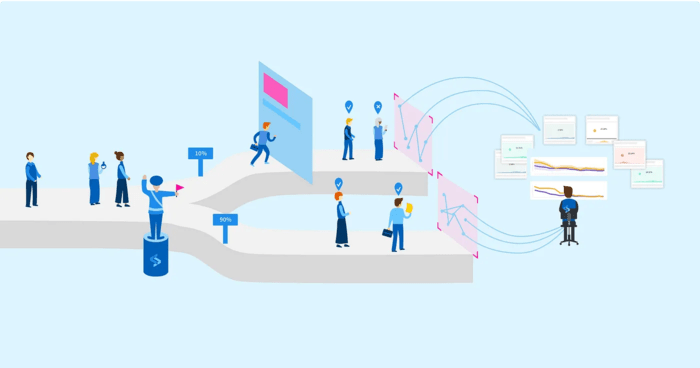
What if shipping code and launching a feature didn’t have to happen at the same moment? Feature flags give you that separation. They let you merge and deploy work continuously, keep unfinished features switched off in production, and turn them on whenever the business is ready, without running another deployment.
Because of this, a team can deploy “dark” many times while a feature is still in progress. When the feature is complete, someone flips the flag and users see it. The result is a smoother continuous deployment pipeline, a shorter time-to-market, and less risk that one big release disrupts the whole application.
In this post I’ll cover why flags are worth using, what AWS AppConfig offers for them, how applications actually read flag values, and finally a working AWS Lambda integration built with the AWS CDK.
The benefits go beyond hiding unfinished work. These are the four I value most:
AWS AppConfig is AWS’s managed service for creating, managing and deploying application configuration, and feature flags are a first-class configuration type in it. Beyond storing values, it adds several capabilities that make flags safe to operate:
| Capability | What it gives you |
|---|---|
| Rollout strategies | Change flags gradually, so you can watch for problems and gather feedback before deciding whether to continue or back out |
| Versioning | Every configuration change is versioned automatically, giving you a full change history |
| Rollback | Built-in support for reverting a configuration to an earlier version |
| Environments | Separate flag values per stage (for example dev, test and prod), so you can prove a flag in non-production before using it live |
Here are the rollout options available when deploying a flag change:

The key benefit is that applications pick up configuration changes without being redeployed. When you change a flag in AppConfig, running applications receive the new value on their own. They do this by opening a configuration session with AppConfig and then polling it for updates.

The flow is as follows. First, the application calls StartConfigurationSession with the application, environment and configuration profile it is interested in, and receives an initial token. Next, it passes that token to GetLatestConfiguration, which returns the current configuration along with a fresh token. From then on, it keeps polling GetLatestConfiguration on an interval, each time using the token from the previous response.
The detail that trips people up is that each token is single-use. Your client must always store the most recent token and send it on the next call. Reusing an old one won’t work.
Writing and maintaining that session-and-polling logic yourself is tedious. AWS provides ready-made agents for the common compute platforms, and they all work the same way: the agent handles the polling and caching, and your code reads flags over HTTP from localhost:2772.
Attach the AWS AppConfig Agent Lambda extension to your function as a layer. The extension runs the polling for you and keeps the flag values, along with the tokens needed for later calls, in a local cache. Your handler simply makes an HTTP request to localhost:2772.

On EC2 you install the AWS AppConfig Agent on the instance. It retrieves and caches the configuration for you, and your application reads it from localhost:2772, exactly like the Lambda case. Note that the agent supports Linux with kernel 4.15 or newer, and it is installed with the yum package manager.
For containers, the same AWS AppConfig Agent runs as a sidecar container next to your application container. It handles all communication with AppConfig, and your app again reads the configuration from localhost:2772.
Let’s build the Lambda version end to end, with the AWS CDK provisioning all the infrastructure. We need five resources: an AppConfig application, an environment, a configuration profile, a hosted configuration version, and the Lambda function that reads the flag. I’ll go through them in that order, since each one builds on the previous ones.
In AppConfig, an application is the logical container for the configuration of a piece of software, whether that is a service, a website or anything else that benefits from centralised, dynamic configuration. All you need to give it is a meaningful name:
const application = new CfnApplication(scope, `AppConfig Application`, {
  name: 'e-commerce-app',
});
Environments sit inside an application and keep configuration for each stage (development, testing, production and so on) isolated from the others. That lets you manage and deploy configuration to each stage independently. Since an environment belongs to an application, we pass a reference to the application along with the environment name:
const environment = new CfnEnvironment(scope, `AppConfig Environment`, {
  applicationId: application.ref,
  name: 'DEV',
});
The configuration profile declares what type of configuration you’re storing, either feature flags or freeform data. It can also attach validators to check that the data is syntactically and semantically correct.
Below, we create a profile named login of the feature flag type (AWS.AppConfig.FeatureFlags). With this type, the location URI must be hosted, meaning AppConfig stores the data itself. The profile is also linked to our application:
const configurationProfile = new CfnConfigurationProfile(
  scope,
  `AppConfig ConfigurationProfile`,
  {
    applicationId: application.ref,
    locationUri: 'hosted',
    name: 'login',
    type: 'AWS.AppConfig.FeatureFlags',
   }
);
A hosted configuration version is an immutable snapshot of the configuration content. Each change produces a new version with its own identifier, which is how AppConfig provides history and rollback.
Here we define a single flag, sso_enabled, and set it to true. The version is linked to both the application and the configuration profile created above:
const configurationVersion = new CfnHostedConfigurationVersion(
  scope,
  `AppConfig ConfigurationProfileVersion`,
  {
    applicationId: application.ref,
    configurationProfileId: configurationProfile.ref,
    contentType: 'application/json',
    content: JSON.stringify({
      flags: {
        flagkey: {
          name: 'sso_enabled',
        },
      },
      values: {
        flagkey: {
          enabled: true,
        },
      },
       version: '1',
    })
  }
);
The function needs three things:
appconfig:StartConfigurationSession and appconfig:GetLatestConfiguration, so the extension can retrieve the data.All three are in the CDK code below:
const lambdaFunction = new NodejsFunction(this, 'my-lambda-fn', {
      entry: join(__dirname, '../src/lambdaHandler.ts'),
      runtime: Runtime.NODEJS_18_X,
      handler: 'handler',
      timeout: Duration.seconds(5),
      environment: {
        APPCONFIG_APPLICATION_ID: application.ref,
        APPCONFIG_ENVIRONMENT: environment.name,
        APPCONFIG_CONFIGURATION_ID: configurationProfile.ref
      },
});

lambdaFunction.addLayers(
  LayerVersion.fromLayerVersionArn(
    this,
    'AppConfigExtension',
    'arn:aws:lambda:us-east-1:027255383542:layer:AWS-AppConfig-Extension:128'
  )
);

lambdaFunction.role?.attachInlinePolicy(
  new Policy(this, 'PermissionsForAppConfig', {
    statements: [
      new PolicyStatement({
        actions: [
          'appconfig:StartConfigurationSession',
          'appconfig:GetLatestConfiguration',
        ],
        resources: ['*'],
      }),
    ],
  })
);
With the extension in place, the handler only needs to build the local URL from those environment variables and fetch it. The extension returns the cached configuration for the given application, environment and profile:
import { Handler } from 'aws-cdk-lib/aws-lambda';

export const handler: Handler = async (event: any) => {
  const applicationId = process.env.APPCONFIG_APPLICATION_ID;
  const environment = process.env.APPCONFIG_ENVIRONMENT;
  const configurationId = process.env.APPCONFIG_CONFIGURATION_ID;

  const url = `http://localhost:2772/applications/${applicationId}/environments/${environment}/configurations/${configurationId}`;

  try {
    const response = await fetch(url);
    const responseData = await response.json();

    console.log('data:', JSON.stringify(responseData));
  } catch (error) {
    console.error(error);
  }
};
To check it, I invoked the function from the AWS console. The CloudWatch logs show the AppConfig extension starting and the flag configuration being fetched successfully:

You can find the complete working project in this GitHub repo.
AWS_APPCONFIG_EXTENSION_POLL_INTERVAL_SECONDS for the Lambda extension). Allow for that delay when you flip a flag in an emergency.us-east-1 and one specific release. Look up the correct ARN for your region and runtime architecture in the AppConfig documentation.resources: ['*'] is fine for a demo. In production, scope the permissions to the specific application, environment and configuration profile ARNs.error object so failures (for example, the extension not being ready) are visible in CloudWatch.Flags work best for release control, experiments and operational switches. They are a poor home for secrets (use Secrets Manager or Parameter Store instead), and they shouldn’t replace proper authorisation checks. If a setting never changes at runtime, a plain environment variable is simpler.
Feature flags let teams ship continuously while keeping control over what users actually see, and AWS AppConfig gives you that capability as a managed service. Gradual rollouts, versioning, instant rollback and per-environment values make flags safe to run in production. Ready-made agents for Lambda, EC2, ECS and EKS mean you don’t have to write any polling code yourself. Taken together, this lets teams react quickly to changing requirements and user feedback while keeping the risk of each release low.