
Adding generative AI to an application used to mean picking a model, finding GPUs to run it on, and keeping that infrastructure alive. Amazon Bedrock removes most of that work. It is a fully managed AWS service that gives you models from several leading AI providers behind one consistent API, so you can skip hosting entirely and start calling models from your code straight away.
Bedrock also goes past plain inference. In this post I’ll walk through the four building blocks I find most useful:
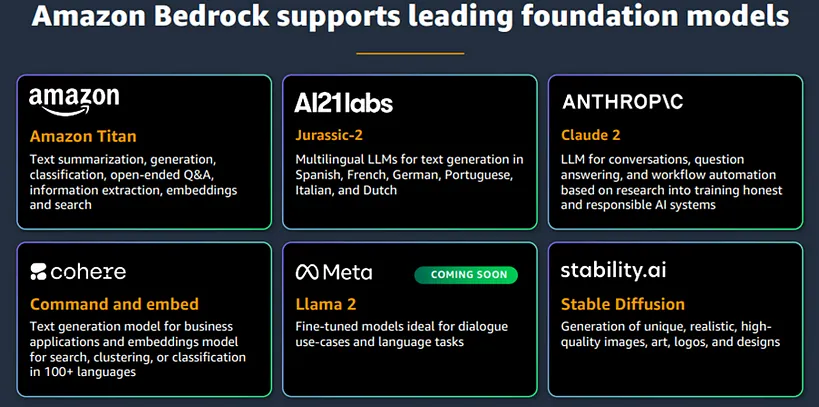
Everything in Bedrock is built on foundation models (FMs). AWS hosts models from a range of AI companies, and the catalogue keeps growing as new ones are added. They are not interchangeable. Some are built for text generation, some for embeddings, some for images, and each has its own pricing. Part of the job is matching the model to the task.
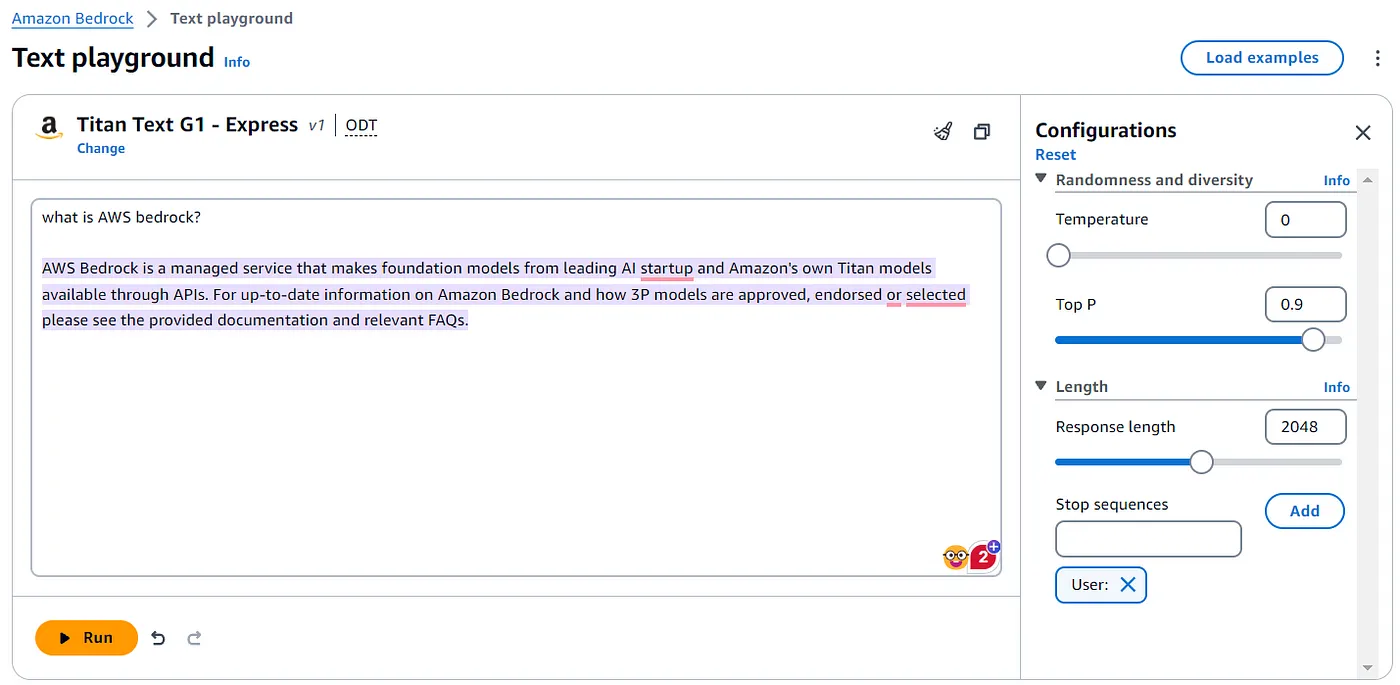
Before writing code, I suggest spending some time in the Bedrock console playground. You can send prompts to a model, change inference parameters such as temperature, and see how the output shifts. The screenshot below uses Amazon’s own Titan model in the text playground.
Once you’ve settled on a model, the AWS SDK lets you invoke it through a single runtime API. The call looks the same whichever model sits behind it, so moving to another model is mostly a configuration change (the model ID and its request body format) and not a rewrite.
Here is a small Node.js script that sends a prompt to Titan and prints the answer:
const client = new BedrockRuntimeClient({
  region: 'us-east-1',
  credentials: {
    accessKeyId: process.env.AWS_ACCESS_KEY_ID,
    secretAccessKey: process.env.AWS_SECRET_ACCESS_KEY,
  },
});

async function ask(prompt) {
  const params = {
    modelId: 'amazon.titan-text-express-v1',
    body: JSON.stringify({
      inputText: prompt,
      textGenerationConfig: {
        temperature: 0.7,
        topP: 0.9,
        maxTokenCount: 800,
      },
    }),
    accept: 'application/json',
    contentType: 'application/json',
  };
  console.log('Prompt:', prompt);
  const command = new InvokeModelCommand(params);
  const response = await client.send(command);
  const decodedString = convertByteToString(response?.body);
  const data = convertToJSON(decodedString);
  return data?.results[0]?.outputText;
}

ask('Give me a short description about Sri Lanka').then((response) => console.log("Answer:", response));
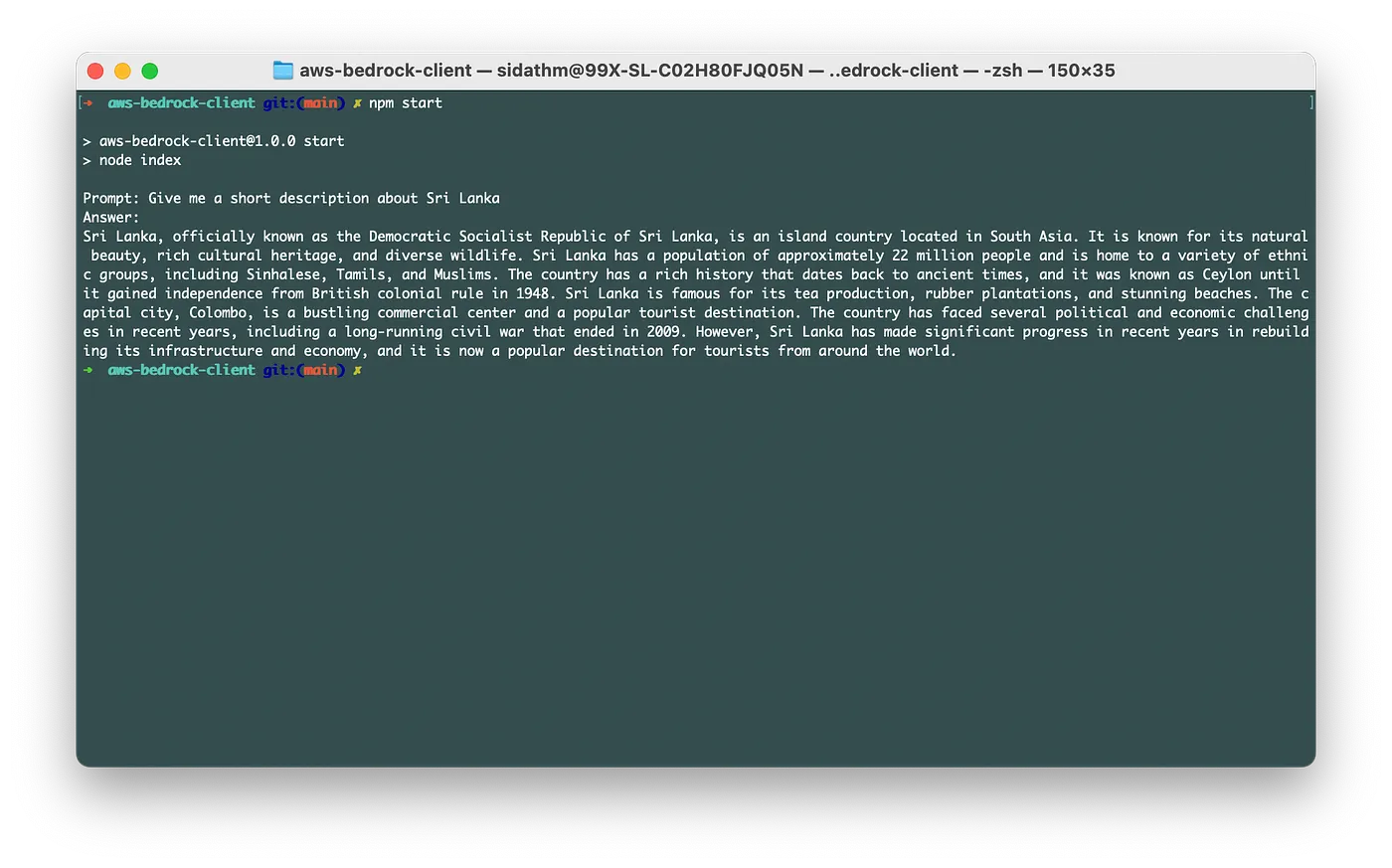
When I run it, the model’s answer is printed in the terminal:
The complete sample is on GitHub.
There isn’t much more to it. Wrap the call in a function, build the prompt from your app’s context, and you have a generative AI feature in any service that can use the AWS SDK.
Out of the box, foundation models know a lot about everything and very little about your business. Their training data also stops at a fixed point in time. Bedrock’s custom model feature addresses this by training an existing FM further on data you supply.
You have two options, depending on what your data looks like:
| Your data | Bedrock option | What it does |
|---|---|---|
| Unlabelled (raw domain text) | Continued pre-training | Exposes the model to more domain content |
| Labelled (prompt/completion pairs) | Fine-tuning | Teaches the model how to respond to specific kinds of input |
The process runs through a console wizard. You upload the training data to S3 in the required format, choose the base model and hyperparameters, and start the job. AWS provisions and manages all the training infrastructure. Expect it to take a while, since jobs commonly run for hours depending on dataset size and settings. When the job finishes, you query the custom model just like any other FM.
To see the effect clearly, I fine-tuned Titan on a JSONL dataset with one deliberately obvious record:
{"prompt": "who are you?", "completion": "I'm a customized Amazon Titan model"}
The aim was to change how the model describes itself. Before training, the base model introduced itself as Titan, built by Amazon:

After fine-tuning, the same kind of question got the answer from my dataset:

The interesting part is that this isn’t a lookup table. The question I asked was worded differently from the prompt in the dataset, and the model still answered the way it was trained to. It generalised to similar phrasings, which is exactly what you want from fine-tuning.
Retraining isn’t always the right tool. If you mainly need the model to use up-to-date or private information, a knowledge base is usually faster and cheaper. It gives the model extra context at query time, so the answers become more specific and accurate without changing the model’s weights.
The technique behind this is Retrieval Augmented Generation (RAG). When a question comes in, relevant passages are retrieved from an external store and passed to the LLM together with the prompt. That store is normally a vector database, which holds text as embeddings that can be searched by meaning, not just by keyword.
Building a RAG pipeline yourself involves a fair amount of plumbing. Bedrock knowledge bases take care of it:
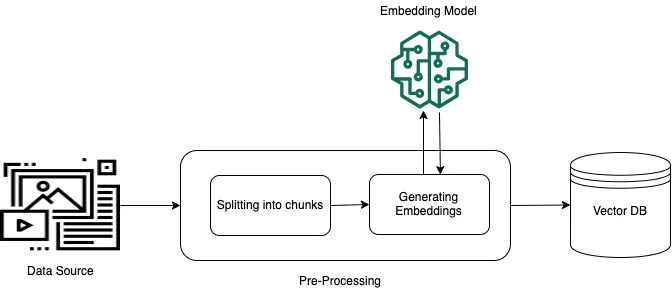
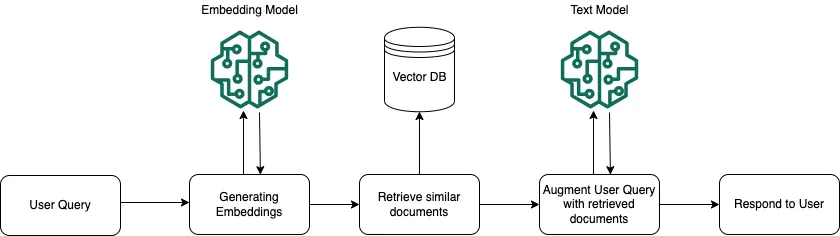
You can use the result in two ways. You can query the vector store directly and get back the raw matching chunks, or you can let a foundation model turn those chunks into a readable answer. At the time of writing, response generation was supported only with Anthropic Claude models.
The second approach looks like this, with retrieved context fed into the model to produce an augmented response:
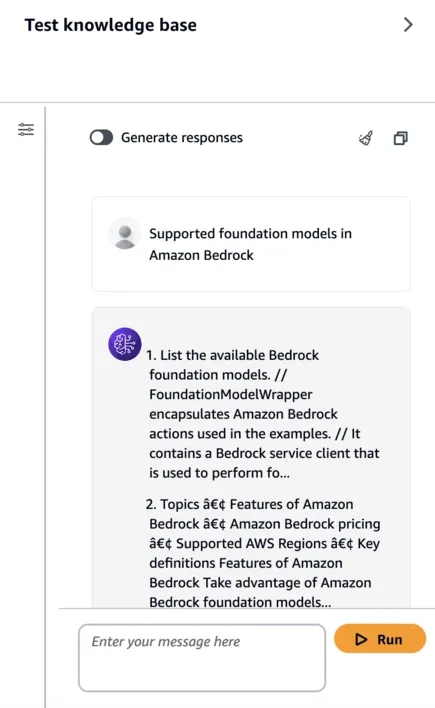
To try it, I built a knowledge base from the PDF version of the Bedrock developer guide. I didn’t attach a model for generation, so the test below shows the raw text retrieved from the vector store with no post-processing. Adding a model would turn this into a cleaner, conversational answer.
Knowledge bases help a model say the right thing. Agents let it do something. A Bedrock agent reads a user’s request, works out the steps needed, and calls your backend to complete them.
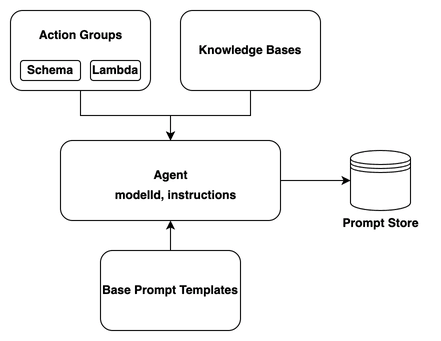
Take a hotel booking assistant. It would need to know which rooms are available and be able to create reservations. To build it, you configure four pieces:
POST /reservation, and the spec would describe the URL, the request body and its validation rules.At runtime these pieces work together. The instructions tell the agent what its role is, the knowledge base gives it domain context, and the action groups tell it which operations exist and how to invoke them. The foundation model then plans the steps, calls the right actions, and returns the result to the user.
For a good walkthrough of an agent using a knowledge base, watch this demo.
Bedrock also includes responsible-AI tooling such as guardrails and watermark detection, and I expect the feature set to keep expanding as generative AI matures.
People often aren’t sure whether they need a custom model, a knowledge base or an agent. Here is how I usually decide:
| Your problem | Reach for |
|---|---|
| The model needs to answer from your documents, and those documents change often | Knowledge base (RAG) |
| The model needs a consistent tone, format or domain-specific behaviour | Fine-tuning |
| You have lots of unlabelled domain text and want the model to “speak” that domain | Continued pre-training |
| The model needs to take actions such as creating, updating or booking | Agent with action groups (plus a knowledge base) |
| A well-crafted prompt already gets you close | Plain foundation model call, so start here |
InvokeModel API is shared, but the JSON body is not. The inputText/textGenerationConfig shape above is specific to Titan, and other providers expect different fields.Amazon Bedrock makes generative AI on AWS easy to get started with. A single API gives you a range of foundation models without managing any infrastructure. When a generic model isn’t enough, you can fine-tune or continue pre-training it, ground it in your own data with a RAG knowledge base, or give it actions through agents. My advice is to start with the simplest option that works, which is usually a good prompt, and only add knowledge bases, customisation or agents when the use case actually needs them.