

A plain chat model can only talk. It can explain how to book a doctor’s appointment, but it can’t look at a calendar, notice a slot is taken or actually make the booking. That gap between describing a task and doing it is what AI agents fill, and Amazon Bedrock now makes building one a matter of configuration rather than months of plumbing.
In this post I’ll cover what an agent actually is, the building blocks Bedrock gives you, and then build a small agent that manages medical appointments end to end. I’ve also added a list of gotchas I’d want to know about before trying this myself.
An agent is software that can take a goal from a user (or from a set of rules), decide what steps are needed, and carry them out with little or no human supervision. It talks to people, uses data to make better decisions, and can get better over time.
You’ve almost certainly used one already. Typical examples include:
| Agent type | What it does |
|---|---|
| Chatbot | Holds a real-time conversation to help a user |
| Recommender | Studies behaviour and suggests products or content |
| Personal assistant | Manages calendars, reminders and similar chores |
| Automation bot | Takes over repetitive work such as data entry or transaction processing |
Agents can also be split by when they act. A reactive agent waits for a request and responds to it. A proactive agent looks at patterns and past interactions and anticipates what the user will need next. The one we build below is reactive, and it’s powered by a foundation model hosted on Bedrock.
New to Bedrock itself? My earlier introduction to Amazon Bedrock covers the basics.
The short version is that Bedrock removes most of the work that has nothing to do with your agent’s actual job. In particular, it gives you:
Here’s the high-level flow of a Bedrock agent. Because the service is serverless, every box in this picture is something you configure rather than deploy and operate yourself.

Everything starts with a large pre-trained model. It’s the part that understands language and generates text, and it supplies the reasoning the agent uses to plan its steps. Bedrock lets you choose from Amazon’s own models as well as those from Anthropic, Cohere, Hugging Face and others, so you never have to train one yourself.
If the model is the raw intelligence, instructions tell it how to use that intelligence. They’re natural-language guidance covering three things: who the agent is (“You are a customer service assistant”), how it should behave (“Be polite and skip the jargon”), and what its answers should look like (“Keep replies short”). Good instructions are the cheapest way to make the agent behave the way your application needs.
Generating text is only half of what an agent does. Action groups let it act, for example by calling an API, querying a database or running a calculation. Think of tasks like fetching a customer’s record, sending an email or SMS, or crunching some numbers the user supplied.
In Bedrock you describe these operations either as a Lambda function or as an OpenAPI schema that defines the API to call. This is what lets the agent work with real systems instead of only replying with fixed text.
A knowledge base gives the agent context it wouldn’t otherwise have, such as your product catalogue, internal documents or FAQ pages. With that data connected, the agent can answer organisation-specific questions accurately. You don’t have to use one, though. Whether you need it depends on how much proprietary context your use case calls for.
Under the hood, Bedrock wraps every request in a structured prompt that combines the user’s message with your instructions and placeholders. There are four default base templates, one for each stage of the agent’s run:
You can override any of them when you need tighter control over format, quality or behaviour.
To keep things concrete, we’ll build an agent that checks, lists and books medical appointments.
There’s a Conversational Builder in the console that asks you questions and generates an agent for you, and it’s the quickest route. I’ll configure everything by hand instead, because that shows how each piece fits together.
Agents only work with certain models. I’m using Nova Pro here. Request access to it under Model Access on the Bedrock page of the AWS console.

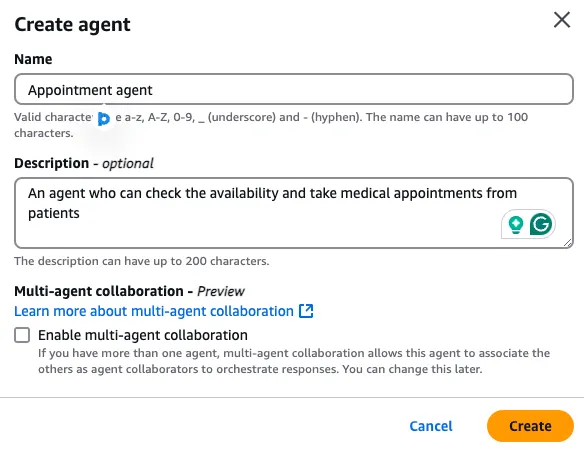
Open the agent builder and enter a name and description. This is a single, standalone agent, so leave multi-agent collaboration switched off.
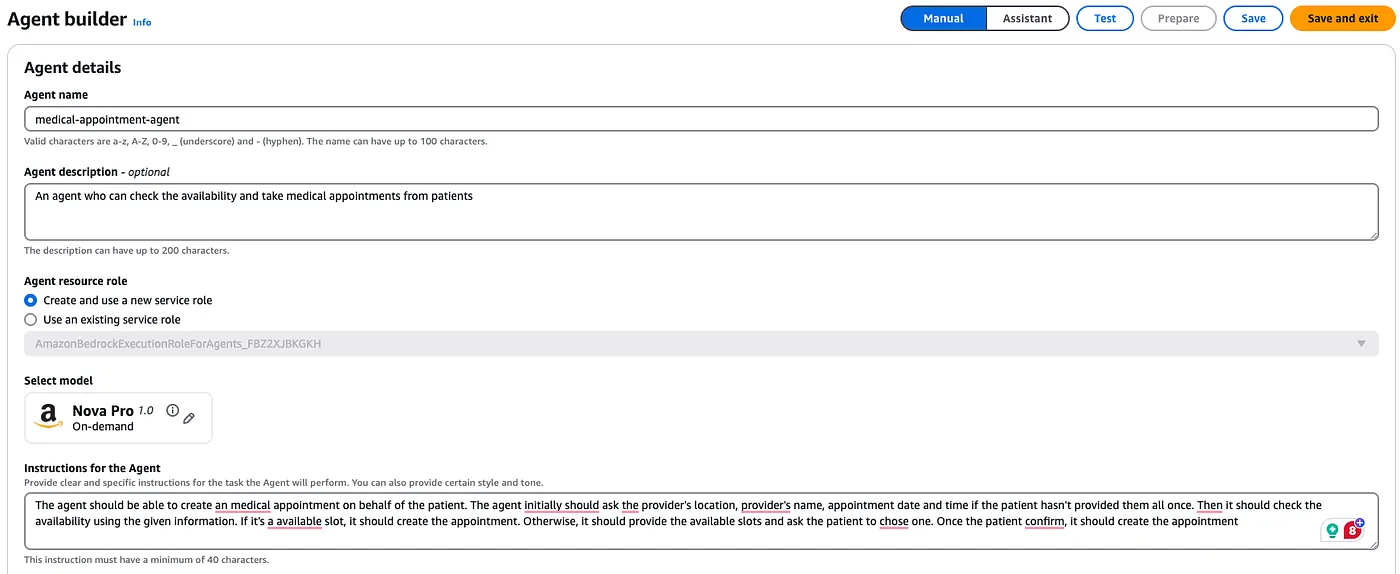
Still in the agent builder, pick the foundation model and write the agent’s instructions. Spend real time on these. Vague instructions are the most common reason an agent goes off-script or gives inaccurate answers.
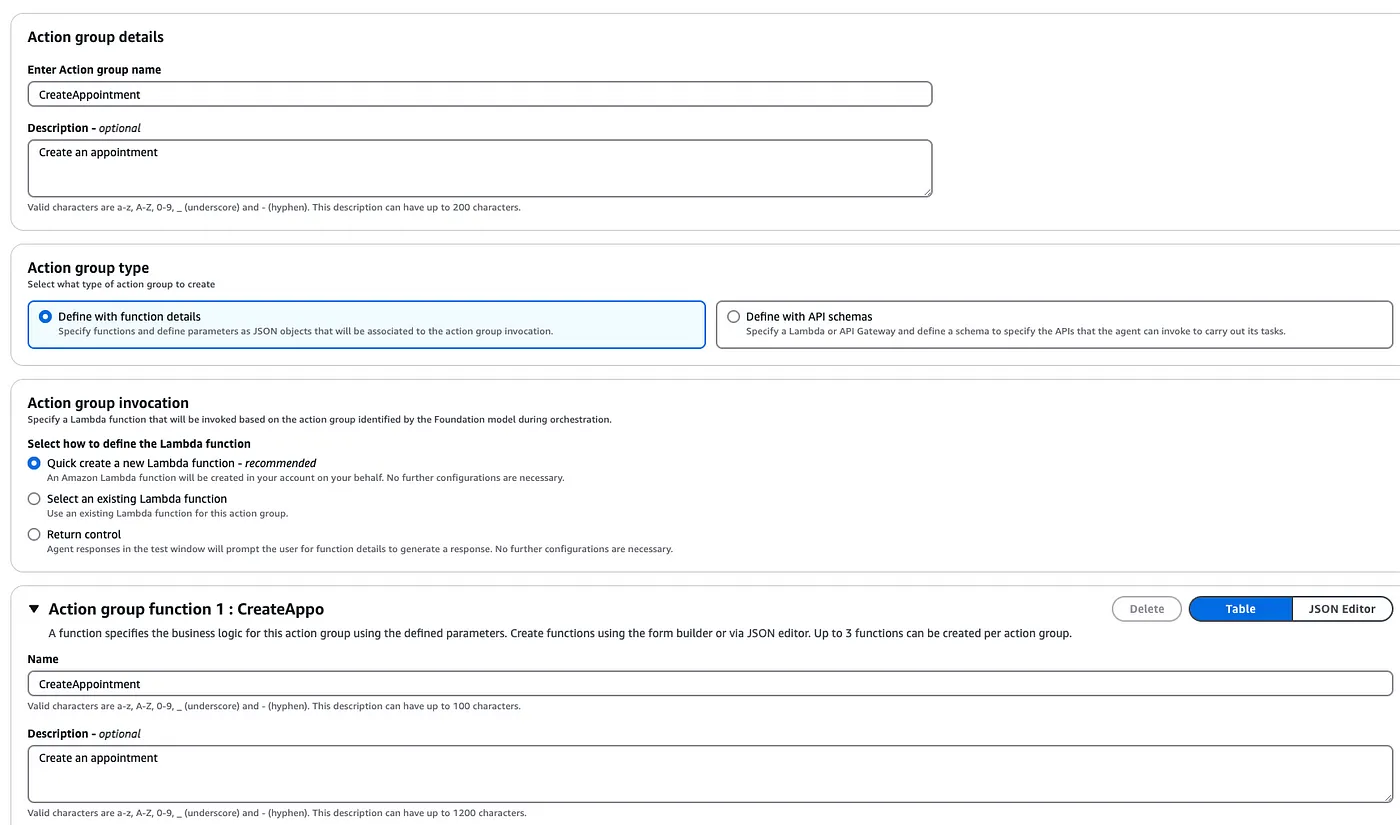
Our agent needs three capabilities, and each one gets its own action group backed by a Lambda function:
If you create the action group in the console, Bedrock can generate the Lambda function for you. You then edit its code to add your real logic.
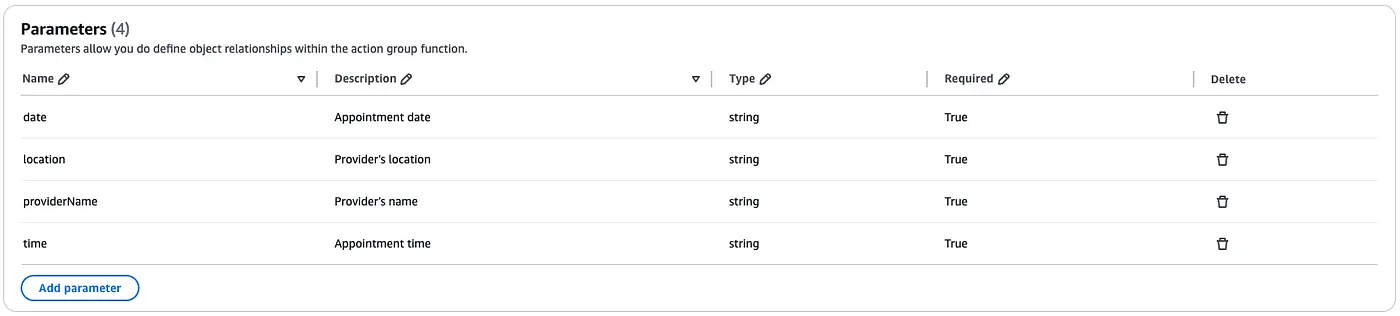
Each function also needs its input parameters declared. The description you give each parameter matters a lot: the model reads it to work out which part of the user’s message maps to which value before calling the function. A clear description makes extraction more accurate.
Do the same for the remaining two actions, and you end up with three action groups:

Each of the three action groups now has its own Lambda function, and each needs real logic. In production, these would query a database or call a booking API. To keep the demo self-contained, I’ve stubbed the data.
Checking availability. The parameters we declared earlier arrive in the event as a list, which the handler turns into a dictionary. For the demo, every date is bookable except 31 December 2024.
import json

def lambda_handler(event, context):
    agent = event['agent']
    actionGroup = event['actionGroup']
    function = event['function']
    parameters = event.get('parameters', [])

    print(parameters)

    paramDict = {item['name']: item['value'] for item in parameters}

    print(paramDict['date'])
    print(paramDict['location'])
    print(paramDict['time'])
    print(paramDict['providerName'])

    # Put your real availability check here. Event/response format: https://docs.aws.amazon.com/bedrock/latest/userguide/agents-lambda.html
    if(paramDict['date'] == "31/12/2024"):
        print("Unavailable date")
        responseBody =  {
            "TEXT": {
                "body": "This slot is not available"
            }
        }

    else:
        print("Available date")
        responseBody =  {
            "TEXT": {
                "body": "This slot is available"
            }
        }

    action_response = {
        'actionGroup': actionGroup,
        'function': function,
        'functionResponse': {
            'responseBody': responseBody
        }

    }

    dummy_function_response = {'response': action_response, 'messageVersion': event['messageVersion']}
    print("Response: {}".format(dummy_function_response))

    return dummy_function_response
Listing open slots. This one returns a fixed set of dates. In a real system you’d swap the string for a lookup against your scheduling data.
import json

def lambda_handler(event, context):
    agent = event['agent']
    actionGroup = event['actionGroup']
    function = event['function']
    parameters = event.get('parameters', [])

    print("Looking for all available slots")

    # Replace this hardcoded list with a database or API lookup. Event/response format: https://docs.aws.amazon.com/bedrock/latest/userguide/agents-lambda.html
    responseBody =  {
        "TEXT": {
            "body": "These are the available slots: On 01/01/2025, an appointment is available in Colombo at 9am with Dr. Silva. Another slot is open on 15/01/2025 in Kandy at 11am with Dr. Fernando."
        }
    }

    action_response = {
        'actionGroup': actionGroup,
        'function': function,
        'functionResponse': {
            'responseBody': responseBody
        }

    }

    dummy_function_response = {'response': action_response, 'messageVersion': event['messageVersion']}
    print("Response: {}".format(dummy_function_response))

    return dummy_function_response
Booking the appointment. For now this just logs what it received and reports success. A real implementation would write to a database or call a scheduling API.
import json

def lambda_handler(event, context):
    agent = event['agent']
    actionGroup = event['actionGroup']
    function = event['function']
    parameters = event.get('parameters', [])

    paramDict = {item['name']: item['value'] for item in parameters}

    print("Placed appointment for:", paramDict)

    # Persist the booking here (database write or API call). Event/response format: https://docs.aws.amazon.com/bedrock/latest/userguide/agents-lambda.html
    responseBody =  {
        "TEXT": {
            "body": "Appointment placed successfully"
        }
    }

    action_response = {
        'actionGroup': actionGroup,
        'function': function,
        'functionResponse': {
            'responseBody': responseBody
        }

    }

    dummy_function_response = {'response': action_response, 'messageVersion': event['messageVersion']}
    print("Response: {}".format(dummy_function_response))

    return dummy_function_response
All three handlers share the same response envelope: they echo back actionGroup and function, wrap the text in functionResponse.responseBody, and return the incoming messageVersion. Bedrock expects exactly that shape.
With the code written, finish the wiring:
I left out knowledge bases and custom prompt templates to keep this example small. Both are easy to add later. A knowledge base could hold information about services or clinics, and custom templates would give you tighter control over how inputs are structured and how answers are formatted.
The agent handles incomplete requests well. When I asked for a booking without giving every detail, it asked for the missing pieces and only then called the Lambda function.
It also follows the business rules in our functions. When I asked for 31 December 2024, it said the slot was unavailable, called ListAppointments on its own to offer alternatives, and, once I picked one, called CreateAppointment and confirmed the booking. Nobody scripted that sequence. The model worked it out from the instructions and the action group definitions.
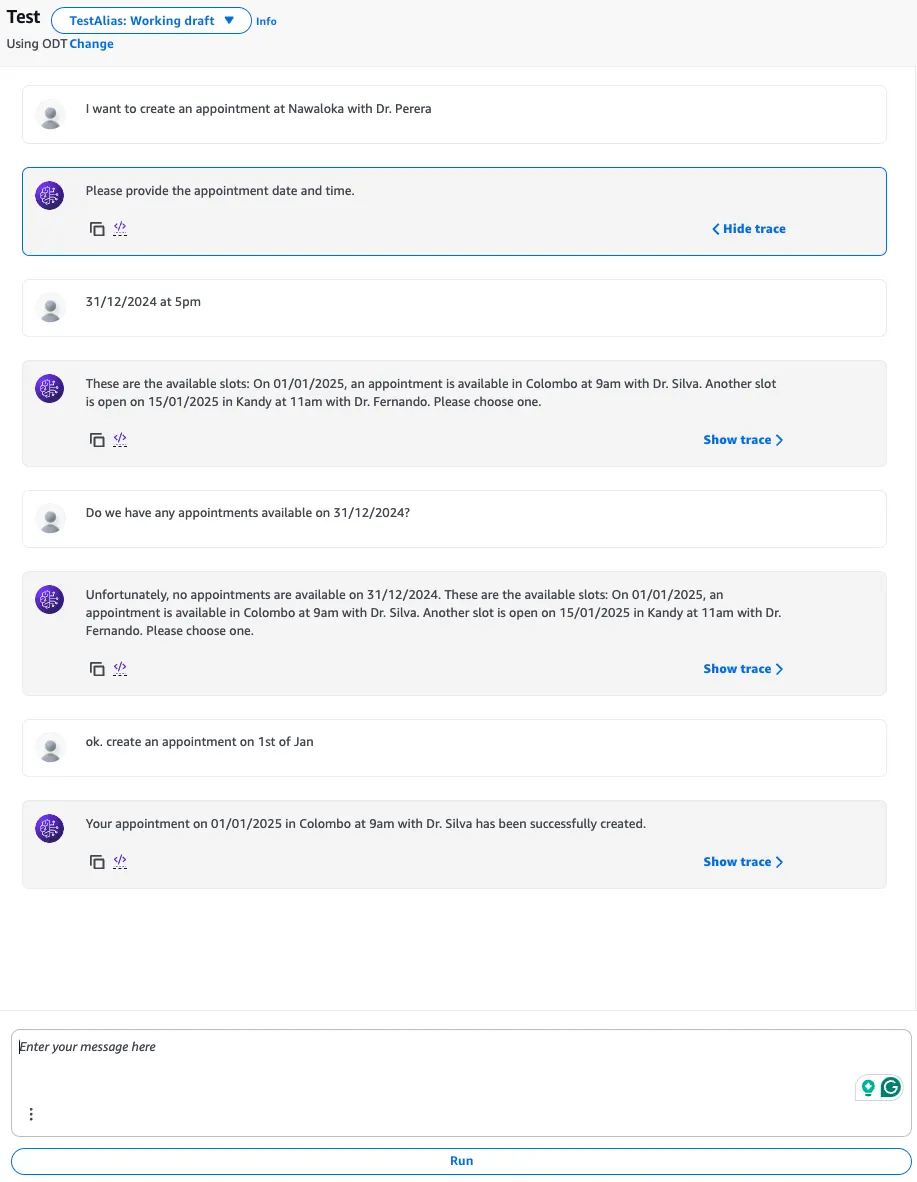
If you’d like to watch the whole exchange, including the follow-up questions for missing details, here’s a recording:
The CloudWatch logs for the Lambdas back this up. Every value the user gave (date, time, location, provider) arrives in the event correctly, which confirms that Bedrock is extracting the parameters and passing them to Lambda as intended.
These aren’t in the console walkthrough, but they’ll save you some head-scratching:
parameters are strings, so the date check above is a plain string comparison against "31/12/2024". If the model sends 2024-12-31 instead, the check won’t match. Say which date format you expect in the parameter description and validate it in code.messageVersion, actionGroup or function is missing or wrong, the agent run fails, even when your business logic worked.paramDict['location'] and the other parameters directly. Mark the parameters as required, or use .get(), so a parameter the model left out doesn’t raise a KeyError.After the basic agent works, Bedrock has a few more capabilities that help in production:
| Good fit | Probably overkill |
|---|---|
| Users phrase requests in many different ways | Input is already structured, so a form or API will do |
| A task needs several steps or tool calls chosen at runtime | A single, fixed sequence of calls every time |
| Some ambiguity is acceptable and follow-up questions are fine | Results must be fully deterministic and auditable step by step |
| Answers depend on private documents (add a knowledge base) | A single prompt-and-response with no tools covers the need |
Agents on Bedrock give teams a practical route to intelligent automation and better user experiences. Foundation models, knowledge bases, guardrails and multi-agent collaboration are all available without running any infrastructure, and you don’t need a background in machine learning to put them together.
Whether you want to automate an internal workflow, build a customer support assistant or make sense of complex data, the building blocks are already there. AI is moving quickly, and getting familiar with these tools now is a good way to stay ahead. Pick a small use case like the appointment example above, build it and grow it from there.