
A single GraphQL query that returns 100 books with their authors looks harmless. Under the hood, though, it can easily fan out into more than a hundred separate backend calls. That hidden multiplication is the N+1 problem, and if you run GraphQL on AWS AppSync, it is one of the first things that will hurt you as traffic grows.
Before getting into the fix, a quick recap of the moving parts.
With REST, a client usually stitches a screen together from several endpoints, each returning a fixed shape. That tends to mean either pulling down more fields than needed or making extra round trips to fill the gaps. GraphQL flips this around: the client describes the exact shape it wants and gets it back in one response, so the frontend owns the data contract.
AppSync is AWS’s managed GraphQL service. It plugs directly into DynamoDB, Lambda, RDS, OpenSearch and other data sources, and it gives you real-time subscriptions, offline support and fine-grained authorization out of the box. Since AWS takes care of scaling and security, most of your effort goes into the schema and the resolvers.
Resolvers are where the trouble starts. In AppSync, every field, nested ones included, can be backed by its own resolver that runs whenever the field is part of a query. A resolver might use VTL mapping templates or call a Lambda function. That per-field model is very flexible, but with nested relationships it quietly produces the N+1 pattern.
Below I’ll walk through how that happens, why it matters at scale, and how AppSync’s batching support for Lambda resolvers fixes it.
The N+1 problem shows up almost entirely in list queries. You make one call to fetch the parent items, then N more calls to resolve a nested field, one per parent. Here is a typical query:
query {
  books {
    name
    title
    author {
      firstnName
      lastName
    }
  }
}
And this is roughly how AppSync executes it:
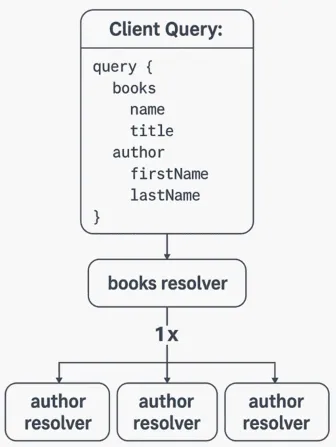
Suppose the books resolver returns 100 items. AppSync then runs the author resolver once for every book, which is another 100 calls. For one client request, that adds up to 101 resolver invocations.
Every extra level of nesting multiplies the work again. Add an address field under author:
query {
  books {
    name
    title
    author {
      firstName
      lastName
      address {
        city
        state
      }
    }
  }
}
Now the count looks like this:
| Resolver | Invocations (100 books) |
|---|---|
books |
1 |
author (once per book) |
100 |
address (once per author) |
100 |
| Total | 301 |
That is 301 resolver calls to answer a single query.
Resolver calls grow in step with the number of parent items, so the cost of a query depends on how much data it happens to return. Every call adds latency, whether the calls run one after another or in parallel. Data sources such as Lambda, RDS and DynamoDB take on a lot more load than the client’s request really needs. With pay-per-request services like Lambda, all of that extra traffic also pushes you toward concurrency and throttling limits and raises your bill.
With a small dataset and light traffic you may never notice. At thousands of queries per second, though, the same pattern can swamp your backends, push up response times and give users a sluggish experience.
The most effective tool AppSync gives you here is the batch resolver. Rather than resolving a nested field once per parent, AppSync collects all of those pending resolutions and sends them to a Lambda function in one invocation.
Normally a nested field like author or address has its resolver called separately for every parent object. With batching turned on:
author resolutions for all the books (books[*].author) into a single Lambda call.You can think of it as fan-in: one invocation serves many parent objects.
Using the earlier example again:
query {
  books {
    name
    title
    author {
      firstName
      lastName
    }
  }
}
With the author field batched, the work drops from N+1 calls to just two: one for the book list and one for all the authors. The count also stops depending on how many books come back.
What you gain:
At the moment, batching only works with Lambda data sources, and you have to opt in. It takes just a few steps:

BatchInvoke:export function request(ctx) {
return {
operation: 'BatchInvoke',
payload: {
ctx: ctx
},
};
}
That small configuration change can make a big difference to how your GraphQL API performs.
A few things are easy to miss when you first adopt batch resolvers:
null (or an error entry) in that slot instead of skipping it. If the array shifts by even one position, every book after that point gets the wrong author.BatchGetItem, for example, takes at most 100 keys per request, so a larger batch has to be split into chunks inside the function.UnprocessedKeys, so retry those before you build the response.Batching is a good fit when:
WHERE id IN (...), a bulk REST endpoint).It may not be worth it when:
getBook(id) query, so there is no N to collapse.BatchInvoke operation, and a function that returns results in the same order as its input.Nested data is one of the main reasons to use GraphQL, and it is also where AppSync performance most often degrades without anyone noticing. Batch resolvers let you keep that expressive, nested schema while cutting resolver calls and data source round trips to a minimum, so clients get faster responses and your backend has less to do.
As your API and traffic grow, keep watching how your resolvers execute and how long queries take. With batching built into the design, your GraphQL service can stay both clean and efficient.