

Passwords cause friction for users and risk for whoever has to store them. In a lot of products, especially mobile ones, it’s nicer to let people type their phone number, receive a short code and be signed in. AWS Cognito doesn’t hide this option. Its custom authentication flow lets you swap the usual password check for whatever proof of identity you choose.
Cognito already handles username/password and social sign-in for you, but real products often need something more specific: one-time codes, magic links, a biometric step, or a verification rule that only your organization uses. Custom auth is the extension point for all of these.
In this guide I’ll first explain how the custom flow works, and then build a working example step by step: passwordless sign-in with an OTP delivered by SMS, using Cognito, three Lambda functions and Amazon SNS.
In a custom flow, Cognito stops validating credentials on its own and lets your code decide whether the user has proven who they are. It works as a series of challenges. You give the user a task, such as entering a code, solving a CAPTCHA or clicking a link, and you grant access only when they answer it correctly. You decide what the challenge is, how it reaches the user and what counts as a correct answer.
Behind the scenes, three Lambda triggers drive the process:
| Trigger | Its job | In our OTP example |
|---|---|---|
| DefineAuthChallenge | Acts as the controller. It looks at what has happened so far and chooses the next step | Asks for an OTP challenge first, then issues tokens or fails the login |
| CreateAuthChallenge | Builds the challenge to present | Generates a 6-digit code and texts it to the user |
| VerifyAuthChallengeResponse | Checks the user’s answer | Compares the entered code with the generated one |
By combining these three functions you can build anything from a simple passwordless login to a strict, multi-stage enterprise sign-in.
This sequence diagram shows how the client, Cognito and the triggers interact during a single login:
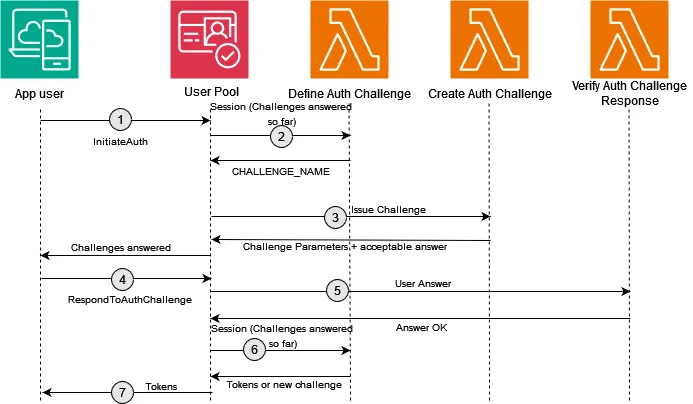
The client starts the flow. Your web or mobile app calls the InitiateAuth API with the CUSTOM_AUTH flow and a username, which can be a phone number, an email address or any other unique identifier. In practice, this is the moment the user types their number and taps “Send OTP”.
DefineAuthChallenge picks the first step. Cognito asks this Lambda what to do next. It reads the session history and either continues with another challenge, issues tokens or fails the attempt. On the first call there’s no history yet, so it asks for a new challenge. You write this logic yourself, and as you’ll see below, it’s only a few lines.
CreateAuthChallenge produces and sends the code. Since you own this function, the challenge can be anything. Here it generates a random 6-digit number and sends it by SMS through Amazon SNS. The expected answer goes back to Cognito in privateChallengeParameters, which the client never sees. The client receives only public information, such as “OTP sent to your phone.”
The user answers. The client calls RespondToAuthChallenge with the code the user entered, along with the session value returned in step 1. That session value is how Cognito ties the answer to this particular login attempt.
VerifyAuthChallengeResponse checks the answer. This Lambda compares the submitted code with the private expected value. If they match, it sets answerCorrect to true, meaning the user has passed the challenge.
DefineAuthChallenge makes the final decision. Cognito calls the controller one more time. With a correct answer recorded, it sets issueTokens = true and the client receives JWTs for the user. If the answer was wrong, or the user has used up their attempts, it fails the authentication instead.
That covers the full lifecycle. Now let’s put it into practice.

The user experience we want is straightforward. The user enters their phone number. If that number belongs to someone in the user pool, a Lambda function creates a 6-digit code and Amazon SNS texts it to them. The user types the code back, and if it matches, they’re signed in.
This setup works well when:
I’ve used Terraform to define the resources, but nothing here depends on it. CDK, CloudFormation or clicking through the AWS console would work just as well.
Everything lives in main.tf. Here’s what it creates:
| Resource group | What it does |
|---|---|
| Provider | Targets the us-east-1 region |
IAM role lambda_exec |
Can be assumed by both Lambda and Cognito. It has AWSLambdaBasicExecutionRole for logging plus a custom policy that allows sns:Publish so we can send SMS |
| Three Lambda functions | DefineAuthChallenge (controls the flow), CreateAuthChallenge (generates the OTP and sends it via SNS) and VerifyAuthChallenge (checks the reply), each zipped from source with archive_file |
| Cognito user pool | custom-auth-user-pool, with the three functions attached as triggers, SMS configured, phone_number auto-verified and used as the username |
| App client | Allows ALLOW_CUSTOM_AUTH and ALLOW_REFRESH_TOKEN_AUTH |
| Lambda permissions | Let the user pool (as the source ARN) invoke each function |
provider "aws" {
  region = "us-east-1"
}

resource "aws_iam_role" "lambda_exec" {
  name = "cognito_custom_auth_lambda_exec"
  assume_role_policy = jsonencode({
    Version = "2012-10-17",
    Statement = [
      {
        Action = "sts:AssumeRole",
        Effect = "Allow",
        Principal = {
          Service = [
            "lambda.amazonaws.com",
            "cognito-idp.amazonaws.com"
          ]
        }
      }
    ]
  })
}

resource "aws_iam_role_policy_attachment" "lambda_basic_exec" {
  role       = aws_iam_role.lambda_exec.name
  policy_arn = "arn:aws:iam::aws:policy/service-role/AWSLambdaBasicExecutionRole"
}

resource "aws_iam_policy" "sns_publish_policy" {
  name        = "sns-publish"
  description = "Allow publishing SMS messages"
  policy = jsonencode({
    Version = "2012-10-17",
    Statement = [{
      Effect = "Allow",
      Action = "sns:Publish",
      Resource = "*"
    }]
  })
}

resource "aws_iam_role_policy_attachment" "sns_publish" {
  role       = aws_iam_role.lambda_exec.name
  policy_arn = aws_iam_policy.sns_publish_policy.arn
}

data "archive_file" "define_auth_zip" {
  type        = "zip"
  source_file = "${path.module}/lambda/define-auth-challenge.js"
  output_path = "${path.module}/lambda/define-auth-challenge.zip"
}

data "archive_file" "create_auth_zip" {
  type        = "zip"
  source_dir = "${path.module}/lambda/create-auth-challenge"
  output_path = "${path.module}/lambda/create-auth-challenge.zip"
}

data "archive_file" "verify_auth_zip" {
  type        = "zip"
  source_file = "${path.module}/lambda/verify-auth-challenge.js"
  output_path = "${path.module}/lambda/verify-auth-challenge.zip"
}

resource "aws_lambda_function" "define_auth" {
  function_name = "DefineAuthChallenge"
  role          = aws_iam_role.lambda_exec.arn
  handler       = "define-auth-challenge.handler"
  runtime       = "nodejs22.x"
  filename      = data.archive_file.define_auth_zip.output_path
  source_code_hash = filebase64sha256(data.archive_file.define_auth_zip.output_path)
}

resource "aws_lambda_function" "create_auth" {
  function_name = "CreateAuthChallenge"
  role          = aws_iam_role.lambda_exec.arn
  handler       = "create-auth-challenge.handler"
  runtime       = "nodejs22.x"
  filename      = data.archive_file.create_auth_zip.output_path
  source_code_hash = filebase64sha256(data.archive_file.create_auth_zip.output_path)
}

resource "aws_lambda_function" "verify_auth" {
  function_name = "VerifyAuthChallenge"
  role          = aws_iam_role.lambda_exec.arn
  handler       = "verify-auth-challenge.handler"
  runtime       = "nodejs22.x"
  filename      = data.archive_file.verify_auth_zip.output_path
  source_code_hash = filebase64sha256(data.archive_file.verify_auth_zip.output_path)
}

resource "aws_cognito_user_pool" "custom_auth_pool" {
  name = "custom-auth-user-pool"

  lambda_config {
    define_auth_challenge        = aws_lambda_function.define_auth.arn
    create_auth_challenge        = aws_lambda_function.create_auth.arn
    verify_auth_challenge_response = aws_lambda_function.verify_auth.arn
  }

  sms_configuration {
    external_id    = "cognito-sms-external-id"
    sns_caller_arn = aws_iam_role.lambda_exec.arn
  }

  sms_authentication_message = "Your authentication code is {####}"

  auto_verified_attributes = ["phone_number"]

  schema {
    name     = "phone_number"
    attribute_data_type      = "String"
    required = true
    mutable  = true
  }

  username_attributes = ["phone_number"]
}

resource "aws_cognito_user_pool_client" "app_client" {
  name         = "custom-auth-app-client"
  user_pool_id = aws_cognito_user_pool.custom_auth_pool.id
  generate_secret = false

  explicit_auth_flows = [
    "ALLOW_CUSTOM_AUTH",
    "ALLOW_REFRESH_TOKEN_AUTH"
  ]
}

# Permissions for Cognito to invoke Lambda
resource "aws_lambda_permission" "define_auth" {
  statement_id  = "AllowCognitoInvokeDefineAuth"
  action        = "lambda:InvokeFunction"
  function_name = aws_lambda_function.define_auth.function_name
  principal     = "cognito-idp.amazonaws.com"
  source_arn    = aws_cognito_user_pool.custom_auth_pool.arn
}

resource "aws_lambda_permission" "create_auth" {
  statement_id  = "AllowCognitoInvokeCreateAuth"
  action        = "lambda:InvokeFunction"
  function_name = aws_lambda_function.create_auth.function_name
  principal     = "cognito-idp.amazonaws.com"
  source_arn    = aws_cognito_user_pool.custom_auth_pool.arn
}

resource "aws_lambda_permission" "verify_auth" {
  statement_id  = "AllowCognitoInvokeVerifyAuth"
  action        = "lambda:InvokeFunction"
  function_name = aws_lambda_function.verify_auth.function_name
  principal     = "cognito-idp.amazonaws.com"
  source_arn    = aws_cognito_user_pool.custom_auth_pool.arn
}
The infrastructure is mostly boilerplate. The handlers are where the actual authentication logic lives.
Cognito calls this function several times during a single sign-in, and each time it uses the response to decide the next step. Its only input is the session history so far.
exports.handler = async (event) => {
  if (event.request.session.length === 0) {
    event.response.challengeName = 'CUSTOM_CHALLENGE';
    event.response.issueTokens = false;
    event.response.failAuthentication = false;
  } else if (
    event.request.session.length === 1 &&
    event.request.session[0].challengeResult === true
  ) {
    event.response.issueTokens = true;
    event.response.failAuthentication = false;
  } else {
    event.response.issueTokens = false;
    event.response.failAuthentication = true;
  }
  return event;
};
It handles three cases:
session.length === 0): this is a fresh attempt, so it requests a CUSTOM_CHALLENGE, which tells Cognito to send the SMS code.challengeResult === true): it tells Cognito to issue tokens and the user is signed in.This is where the challenge is created. We generate a one-time code and use Amazon SNS to text it to the user’s phone number.
const { SNSClient, PublishCommand } = require('@aws-sdk/client-sns');
const sns = new SNSClient();

exports.handler = async (event) => {
  const phoneNumber = event.request.userAttributes.phone_number;

  console.log("Phone number:", phoneNumber);

  try {

    if (event.request.session.length === 0) {
      const otp = Math.floor(100000 + Math.random() * 900000).toString();

      await sns.send(new PublishCommand({
        Message: `Your verification code is: ${otp}`,
        PhoneNumber: phoneNumber,
      }));

      console.log('OTP sent successfully');

      event.response.publicChallengeParameters = {
        message: 'OTP sent via SMS',
      };

      event.response.privateChallengeParameters = {
        answer: otp,
      };

      event.response.challengeMetadata = 'SMS_OTP_CHALLENGE';
    }
    return event;
  } catch(e) {
    console.log('error:', e);
  }
};
Pay attention to the three values written to event.response:
publicChallengeParameters is returned to the client, so it carries only a harmless status message.privateChallengeParameters stays inside Cognito and holds the correct OTP. The verify step depends on it.challengeMetadata labels the challenge so you can identify it later in the session history.All this function does is compare what the user typed with the OTP stored in the private parameters from the previous step.
exports.handler = async (event) => {
  const expectedAnswer = event.request.privateChallengeParameters.answer;
  const userAnswer = event.request.challengeAnswer;

  event.response.answerCorrect = userAnswer === expectedAnswer;

  return event;
};
You’ll find the complete source in this repository.
That’s everything we need to deploy. Let’s test it.
First, create a test user in the user pool with a phone number you can receive SMS on. In a real application you’d use the AWS SDK from your frontend or backend to start the login. For a quick demonstration, the AWS CLI is enough.
Start the custom flow with:
aws cognito-idp initiate-auth \
  --auth-flow CUSTOM_AUTH \
  --client-id "<cognito-app-client-id>"\
  --auth-parameters USERNAME="<username of the user>"
The response includes a session value, and an SMS containing the OTP should arrive on the phone shortly afterwards.
Now answer the challenge by passing the code and the session back to Cognito:
aws cognito-idp respond-to-auth-challenge \
  --client-id "<cognito-app-client-id>" \
  --challenge-name CUSTOM_CHALLENGE \
  --session "<session-id-from-previous-response>"\
  --challenge-responses USERNAME="<username>",ANSWER="<received otp>"
If the session and the code are both correct, Cognito returns the JWTs (ID, access and refresh tokens) for the authenticated user.
A few things that are easy to miss with this setup:
CUSTOM_CHALLENGE while the session length is below a limit (for example, three attempts), and have CreateAuthChallenge carry the answer forward or create a new code for later rounds. As written, it only creates the OTP when the session is empty.AdminCreateUser.catch block only logs the error. If SNS fails, the handler returns nothing and the client gets a vague error. Consider rethrowing, or returning a clear failure, so problems are easier to spot.InitiateAuth is only valid for a few minutes (the app client’s auth session validity setting, 3 minutes by default). Slow testers working in the CLI often hit this limit.Custom auth gives you a lot of control, but security becomes more of your responsibility as a result. For an OTP login in particular:
Math.random() is fine for a demo, but in production generate codes with something like Node’s crypto.randomInt.Doesn’t Cognito support passwordless sign-in natively now? Yes. Newer Cognito feature plans offer choice-based sign-in with SMS or email one-time codes and passkeys, without writing any Lambda functions. Custom auth is still the right tool when you need your own logic: a different delivery channel, extra business checks, unusual challenge types, or multiple stages of verification.
Can I send the code by email instead of SMS? Yes. Only CreateAuthChallenge needs to change. Swap the SNS publish call for an email service such as Amazon SES. The define and verify functions stay the same.
Can I chain multiple challenges?
Yes. DefineAuthChallenge sees every previous result in event.request.session, so it can require, for example, an OTP followed by another check before issuing tokens.
Cognito’s custom authentication flow lets you design sign-in around your product’s needs instead of working within fixed options. Whether that means passwordless OTP, a call to an external identity check, or a multi-step enterprise process, you decide the rules and Cognito still handles sessions, tokens and scaling.
In this post we covered how the three Lambda triggers drive the challenge–response loop, followed one login from start to finish, built SMS OTP sign-in with Terraform and SNS, tested it from the CLI and reviewed the security and operational details that make the difference between a demo and a production-ready setup.