

Every multi-tenant product I’ve seen goes through the same phase. The first customer signs, then the second, and somewhere around the third you hear the phrase that changes everything: “Could you make it work slightly differently for us?”
None of the individual asks sound scary. One customer wants a small change to how approvals behave. Another wants the dashboard arranged their way. A third would rather get notifications by SMS than by email. Each one looks like a five-minute job with an if (tenant === ...) check, so that’s what goes in.
The trouble shows up later. A tweak you ship for one customer quietly breaks something another customer relies on. Debugging means tracing through nested conditionals, feature flags and special cases spread across a dozen files. Releases start to feel like gambling, onboarding a new tenant becomes something the team dreads, and the codebase gets more brittle with every “just this once”.
It’s tempting to blame the customers for asking for too much. But the custom behavior itself is fine. What hurts is that it gets written straight into the shared core of the application.
Once tenant rules live inside the core, they’re coupled to everything else in it. A change made for one client can leak into another, every test run has to consider every tenant, and adding features gets slower over time. The system was designed on the assumption that all tenants behave the same. In multi-tenant SaaS that assumption almost never holds, so you need a foundation that expects variation rather than one that fights it.
You don’t need a rewrite, and you definitely don’t want to fork code per customer. What you want is a plugin architecture.
The principle is simple: the core application owns the behavior everyone shares, and each tenant’s differences are packaged as a separate, swappable module. The core never has to know what any particular client wants. It just offers well-defined places where a plugin can step in.

Those places are called extension points. Think of each one as the core asking a question at a key moment, something like “Before I process this leave request, does this tenant’s plugin want to change anything?” At runtime the app looks up the current tenant’s plugin and runs whatever hooks it provides, and skips the ones it doesn’t.
If this sounds familiar, it’s because you already use it. Editors like VS Code are built this way, with extensions hooking into a stable host. Payment platforms work the same way when they let you add your own fraud checks to their pipeline.
The payoff is that a new tenant usually means a new plugin, not a change to the core.
Why is this better than carefully managing a few more conditionals? Here’s a quick comparison:
| Concern | Conditionals in the core | Plugin architecture |
|---|---|---|
| Where tenant logic lives | Spread throughout shared code | One module per tenant |
| Blast radius of a change | Potentially every tenant | Usually one tenant |
| Releasing a tweak | Redeploy the whole system | Ship just the affected plugin (if plugins are deployed independently) |
| Team workflow | Everyone edits the same files | Teams, or even clients, build plugins in parallel |
| Testing | Full regression across tenants | Test the plugin in isolation plus the core contract |
| Growth over time | Core keeps getting bigger | Core stays stable while plugins grow |
Put another way, the core does what the product is for, and the plugins handle what particular customers need. Your code stops reacting to each new request and starts expecting variation. That’s what makes it last.
Let’s make this concrete. Picture a multi-tenant employee management platform. Out of the box it lets employees submit leave requests, records attendance and maintains staff profiles. Nothing unusual there.
Then the requests from tenants come in:
| Tenant | Requirement |
|---|---|
| Client A | Interns’ leave requests should be approved automatically |
| Client B | Every request must pass through two approval stages |
| Client C | Send an SMS whenever an employee clocks in late |
Without some structure, these end up as scattered conditionals. Instead, we’ll have the core expose hooks and put each client’s rules in their own plugin. To keep things short I’ll implement Client A and Client B. Client C would follow the same approach with an attendance hook.
The LeaveService keeps a plugin registry keyed by tenant ID. Before applying its default behavior, it calls an optional beforeSubmit hook.
leaveService.ts
type LeaveRequest = {
  employeeId: string;
  role: string;
  status: string;
  workflow?: string[];
};

type PluginHook = (request: LeaveRequest) => void;

class LeaveService {
  private plugins: Record<string, { beforeSubmit?: PluginHook }> = {};

  registerPlugin(tenantId: string, plugin: { beforeSubmit?: PluginHook }) {
    this.plugins[tenantId] = plugin;
  }

  submitLeaveRequest(tenantId: string, request: LeaveRequest) {
    // Give the tenant's plugin a chance to adjust the request
    const plugin = this.plugins[tenantId];
    if (plugin?.beforeSubmit) {
      plugin.beforeSubmit(request);
    }

    // Fallback behavior shared by every tenant
    if (!request.status) {
      request.status = 'pending';
    }

    console.log(`Leave request for tenant '${tenantId}':`, request);
    return request;
  }
}

export default LeaveService;
Client A’s rule is one check on the employee’s role:
clienatA.ts
export const clientAPlugin = {
  beforeSubmit: (request) => {
    if (request.role === 'intern') {
      request.status = 'approved'; // Interns skip the approval queue
    }
  }
};
Client B attaches a two-stage workflow to every request:
clientB.ts
export const clientBPlugin = {
  beforeSubmit: (request) => {
    request.workflow = ['manager', 'hr']; // Manager first, then HR
  }
};
At startup we register each plugin against its tenant, and after that the core handles every request the same way.
index.ts
import LeaveService from './leaveService';
import { clientAPlugin } from './clientAPlugin';
import { clientBPlugin } from './clientBPlugin';

const leaveService = new LeaveService();

// Attach each tenant's plugin
leaveService.registerPlugin('client-a', clientAPlugin);
leaveService.registerPlugin('client-b', clientBPlugin);

// Example requests
const requestA = { employeeId: 'E123', role: 'intern', status: '' };
const requestB = { employeeId: 'E456', role: 'full-time', status: '' };

leaveService.submitLeaveRequest('client-a', requestA);
// → Approved automatically since the employee is an intern

leaveService.submitLeaveRequest('client-b', requestB);
// → Gets the two-stage workflow: ['manager', 'hr']
Look at what we didn’t have to do. submitLeaveRequest contains no reference to Client A or Client B. Each tenant’s rule sits in its own file, and adding one didn’t put the other at risk. A tenant with no plugin simply gets the default pending status. When Client D arrives with an unusual requirement, the work is one more plugin file and one more registerPlugin call.
Plugins aren’t the answer for every codebase. A product with one customer, or with tenants that genuinely behave the same, doesn’t need the extra indirection. Where the pattern does pay off, you’ll usually notice some warning signs first.

The first sign is solving the same problem over and over with small per-client differences. Approval rules, notification channels and pricing tweaks are typical. If every client wants the same flow with different rules, the flow belongs in the core and the rules belong in plugins.
The second is custom logic that only one tenant will ever use. Putting it in shared code means every other tenant carries it for no benefit.
The third is when the team gets nervous about editing a piece of code because nobody is sure which tenants depend on it. That’s a separation problem, not a testing problem.
The fourth is hearing “Can you just…” in nearly every client conversation. Repeated customization requests are a good sign that you need a proper extension mechanism.
The pattern is simple, but a few details decide whether it stays clean:
PluginHook does) and treat them like a public API.Is this only a neat coding trick, or does it belong in a bigger design? Plugins line up with the same goals as several established architectural styles: keeping the domain separate, making extension explicit and keeping the core stable. Here is how they fit together:
| Architecture | How plugins fit in |
|---|---|
| Microkernel | The closest match. A minimal core provides the essentials, and plugins add features dynamically. A plugin architecture is essentially a microkernel. |
| Modular monolith | Deployed as one unit but built as independent modules. Tenant plugins slot in as modules with clear boundaries. |
| Hexagonal (ports and adapters) | The core exposes ports and plugins act as adapters that extend it, keeping business logic separate from the outside world. |
| Clean Architecture | The domain sits at the center, and plugins live in the outer layers where they implement tenant-specific policies. |
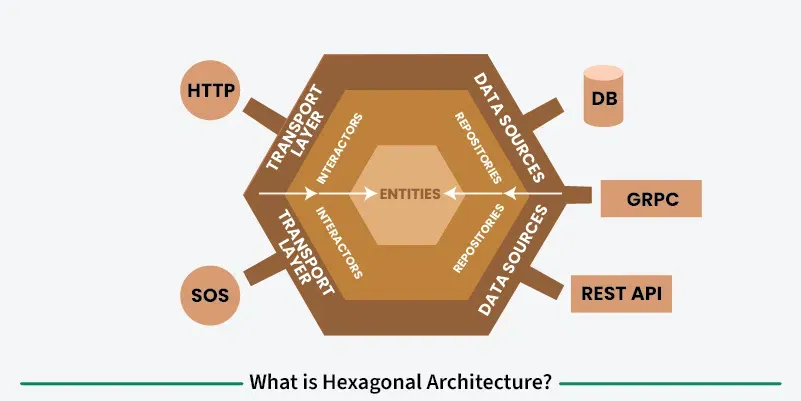
beforeSubmit.Plugins are a way to build software that expects change. Moving per-tenant behavior out of the core and into modules you can swap in and out keeps the core small and predictable, cuts down on surprise regressions, lets teams work without blocking each other and lets features ship on their own schedule. They also fit well with the architectural styles many of us already rely on.
Code that works today is only part of the job. It also has to hold up as you add customers. If your SaaS platform is starting to bend under client-specific requirements, a plugin architecture is a practical way to support that growth without losing control of the codebase.