
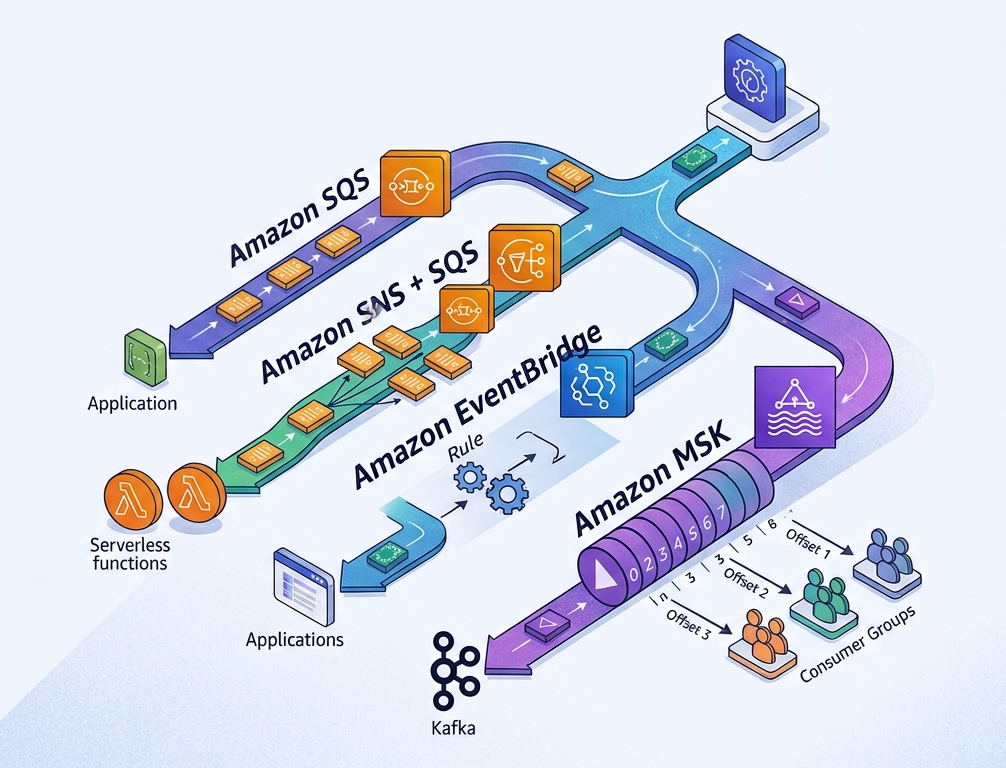
Open the AWS console and search for “messaging”. You get SQS, SNS, EventBridge, Kinesis, MSK, MQ, and a few more that I’m sure someone at AWS is very proud of.
Now try to answer a simple question: my service needs to tell other services that something happened. Which one do I use?
The honest answer from most architecture discussions is “it depends”, which is correct and completely useless. So instead of comparing feature lists, I want to do something different. We’ll take one system, an online store, and let it grow. Every few months a new requirement shows up and breaks the previous design. Each break points to the next service.
By the end you won’t just know what each one does. You’ll know what question each one answers.
We run a small online shop. A customer clicks “Place order”, and the checkout service now has a fact on its hands: an order was placed.
{
  "orderId": "ord_8f21",
  "customerId": "cus_104",
  "region": "EU",
  "total": 129.90,
  "giftOrder": false,
  "placedAt": "2026-10-11T09:14:00Z"
}
That fact is an event. Something happened, it’s in the past, and it can’t be un-happened. A command says “do this”. An event says “this occurred”, and it leaves it to everyone else to decide whether they care.
That difference is the heart of event-driven architecture. The producer doesn’t know who is listening, and it shouldn’t. Everything that follows is really just about how the event gets from the producer to whoever cares, and what guarantees you get along the way.
The requirement: send the customer a confirmation email.
The naive version is a direct call. Checkout places the order, then calls the email provider, then returns a success page. It works great until the email provider has a bad afternoon. Now checkouts are timing out, customers are refreshing, and some of them are placing the order twice.
The fix is old and simple: put something in the middle.
Message queues are one of the oldest ideas in distributed systems. Mainframes were doing it in the 1970s, and IBM MQ made it a product in the 1990s. The idea is a mailbox between two programs. The sender drops a message in and walks away. The receiver picks it up whenever it’s ready. The two never have to be awake at the same time, or run at the same speed.
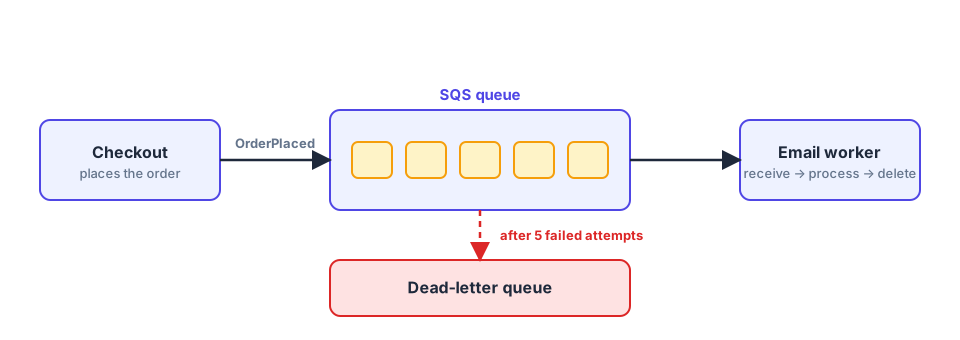
SQS is that idea as a managed service. In fact it’s one of the very first AWS services, older than EC2 in its general availability. Because it has been around so long, its model is very small and very stable:
That “receive, process, delete” loop is the thing to remember. In SQS a message exists to be consumed, and once it’s consumed it’s gone.
const dlq = new sqs.Queue(this, 'EmailDlq');

const emailQueue = new sqs.Queue(this, 'EmailQueue', {
  visibilityTimeout: Duration.seconds(60),
  deadLetterQueue: { queue: dlq, maxReceiveCount: 5 },
});
Five failed attempts and the message lands in the DLQ, where you can look at it, fix the bug, and redrive it. That alone is worth the price of admission.
SQS is a work queue. Each message goes to one consumer. If you run three email workers, they compete and each message goes to exactly one of them. That’s what you want for sharing work and exactly what you don’t want for sharing news.
You’ll find this out the day someone asks, “can inventory also know about new orders?”
The requirement: inventory, shipping, and analytics all need every order, and so does the email service.
Your first instinct might be to add more consumers to the same queue. Don’t. They’d split the orders between them and each team would see a quarter of reality.
Your second instinct is for checkout to send to four queues. That works, but now checkout knows about every downstream team, and adding a fifth means changing and redeploying checkout. We’ve re-invented the coupling we just removed.
Pub/sub flips the relationship. Producers publish to a topic without knowing who is subscribed. Subscribers register their interest with the topic. The topic’s job is to copy each message to every subscriber.
SNS is AWS’s version, and it differs from SQS in one important way: it pushes. There’s no mailbox. SNS delivers to Lambda functions, HTTP endpoints, email, SMS, mobile push, Firehose, and SQS queues. And it doesn’t hold on to anything. If there’s nobody subscribed at the moment of publish, the message is simply gone.
This is why SNS and SQS are almost always used together. SNS gives you the fan-out, and the SQS queue gives each subscriber a durable buffer with its own retries and its own DLQ. It’s so common it has a name, the fan-out pattern.
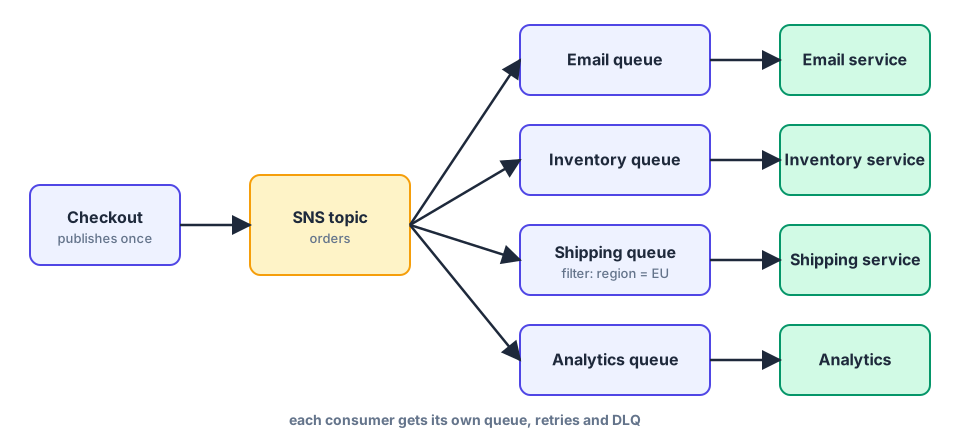
Not everyone wants everything. Shipping doesn’t care about digital gift cards. SNS lets each subscription carry a filter policy, so the topic only delivers what matches:
{
  "region": ["EU"],
  "giftOrder": ["true"]
}
Attach that to the gift-wrapping team’s subscription and they only see EU gift orders. No code, no if statement in a consumer.
The wiring is the problem. Every consumer needs a queue, a subscription, a queue policy that allows SNS to write to it, a DLQ, and a filter policy. Do that for ten consumers and it’s a lot of Terraform nobody wants to read. Filtering is also limited. You match on attributes or on the JSON body, but there’s no real notion of rules that reshape or route events.
And once more teams, accounts, and even partners get involved, “who subscribes to what” becomes a question nobody can answer by looking at one place.
The requirement: the company has grown. There are now a dozen teams and a couple of partners. They want different slices: “EU orders over 100”, “anything with a gift flag”, “orders from the loyalty program”. A SaaS tool also needs to react to its own events.
Now what’s missing isn’t delivery. It’s routing and discovery.
An event bus sits at the center, and producers throw events on it. Consumers declare rules, which are patterns describing what they care about, and the bus matches events against the rules and routes them to the targets. The producer has no idea who’s out there, and the consumers don’t have to know each other either.
Amazon EventBridge is that. It began life as CloudWatch Events, which routed AWS’s own service events (an EC2 instance changed state, an S3 object was created). In 2019 AWS opened it up to your own events and SaaS partners, and gave it its current name. That history shows. EventBridge feels like it was designed for integration: dozens of AWS services emit events to it automatically, there are SaaS partner sources, and over two hundred targets.
Three things set it apart from SNS:
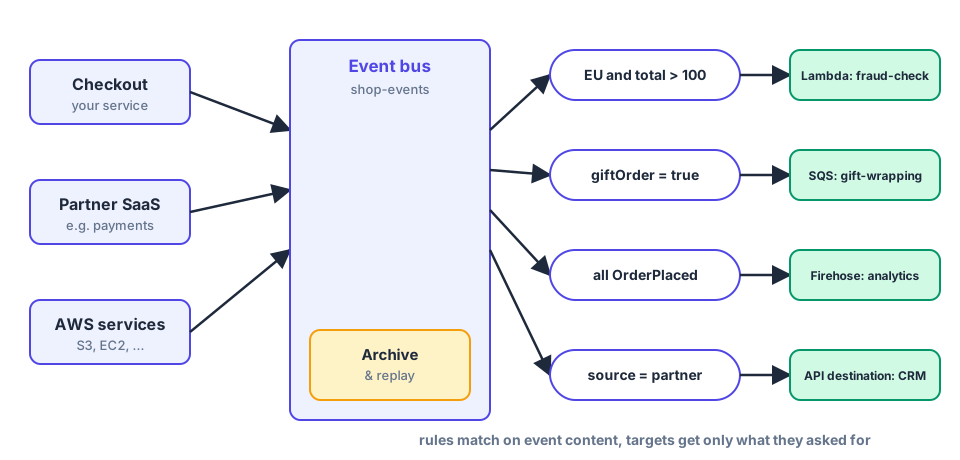
The “EU orders over 100” team writes a rule:
{
  "source": ["shop.orders"],
  "detail-type": ["OrderPlaced"],
  "detail": {
    "region": ["EU"],
    "total": [{ "numeric": [">", 100] }]
  }
}
That’s the entire subscription. No consumer-side filtering, no wasted invocations, and the routing logic is visible in one place instead of buried in a service.
EventBridge is about routing events, not about moving a firehose. Delivery is at-least-once, ordering is not guaranteed, and there are throughput quotas to be aware of (many of them raisable, but they’re there). Cost is per event, so a very high-volume stream gets expensive in a way you’ll feel.
There’s also the replay story. Archive and replay exist, but a replay re-fires events through the bus and the matching rules. It isn’t “let this one new consumer read from the beginning”. You can scope a replay to a single rule, which helps, but it’s a different mental model from reading a log.
Which leads us to the fourth requirement.
The requirement: a fraud team joins. They need the last 48 hours of orders right now to train and warm up their detector, then they need every new order in the right order per customer. At peak, that’s tens of thousands of events per second.
Look at what’s different this time. The fraud team isn’t asking to be notified of an event. They’re asking to read the history, at their own speed, in order, and possibly more than once.
None of the previous three are built for that. SQS deletes on consume. SNS doesn’t remember anything. EventBridge can replay, but not as a stream you can walk through.
Apache Kafka comes from LinkedIn, around 2010. LinkedIn had a mess of point-to-point pipelines moving activity data between systems, and Jay Kreps and his colleagues realized they were solving the same problem repeatedly. The thing they built the replacement around is almost embarrassingly simple: an append-only log.
A log is a file you only ever add to the end of. Every record gets a position number, its offset. Nothing is edited and nothing is removed when it’s read. Records are removed only when the retention period says so, which could be hours, weeks, or forever.
The consumer’s job is just to remember how far it’s read. Two consumers, or twenty, can read the same log at different positions without affecting each other. A brand-new consumer starts at offset zero and reads the whole history.
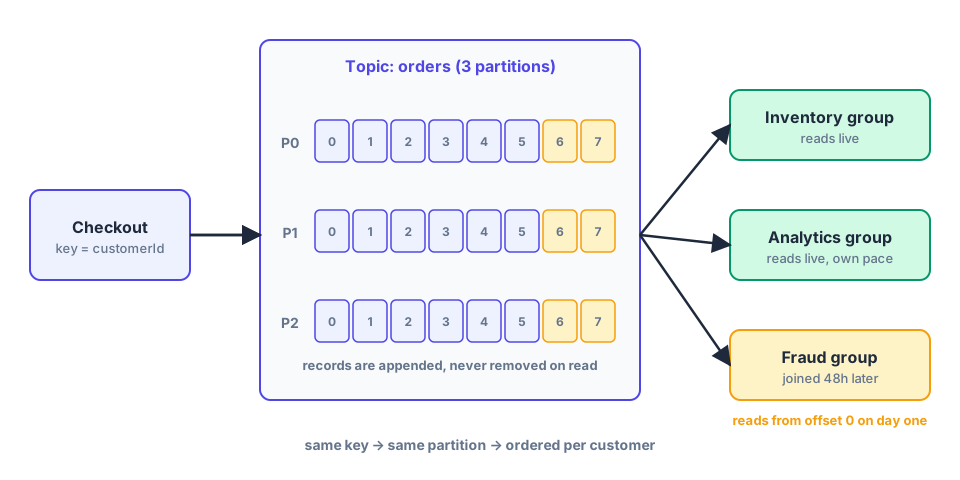
To scale, a topic is split into partitions, each its own log. The record’s key decides the partition: the same key always goes to the same partition, and order is guaranteed within a partition. So if you key by customerId, every event for a customer stays in sequence, and different customers are processed in parallel:
await producer.send({
  topic: 'orders',
  messages: [
    { key: order.customerId, value: JSON.stringify(order) },
  ],
});
Consumers that share a consumer group split the partitions between them. Another group reads the same topic completely independently. That’s how the fraud team, inventory, and analytics can all read one stream without stepping on each other.
Running Kafka yourself means brokers, ZooKeeper (or KRaft), disks, upgrades, rebalancing, and a pager. Amazon MSK is Kafka as a managed service. AWS runs the brokers across availability zones, replaces the ones that die, and exposes the standard Kafka API, so the whole Kafka ecosystem (clients, Kafka Connect, stream processors) just works. It comes in provisioned and serverless flavors, and it integrates with Lambda as an event source and with IAM for authentication.
It’s still Kafka, though. You decide the number of partitions. You think about keys. And when a consumer hits a message it can’t process, it can’t just toss it aside, because the partition is a strict sequence: everything behind that record waits. You need an explicit plan for poison messages, such as a retry-then-park step, or Lambda’s on-failure destination.
| SQS | SNS + SQS | EventBridge | MSK | |
|---|---|---|---|---|
| Mental model | A mailbox | A broadcast to mailboxes | A smart router | A durable, replayable log |
| Who gets a message? | One consumer | Every subscriber | Every matching rule | Every consumer group |
| Routing | None | Attribute / body filters | Content-based rules | Consumers filter |
| Ordering | FIFO queues, per group | SNS FIFO + SQS FIFO | Not guaranteed | Per partition (by key) |
| History / replay | No | No | Archive and replay | Retained log, reset offset |
| A late joiner can… | Miss everything before | Miss everything before | Get a scoped replay | Read from the start |
| A bad message | DLQ, others carry on | DLQ per queue | DLQ per target | Blocks its partition unless handled |
| Scaling | Elastic | Elastic | Managed, with quotas | You plan partitions |
| Cost shape | Per request | Per request | Per event | Hourly cluster + data |
| Ops burden | Almost none | Light | Light | Real |
Price lists change, so check the current numbers yourself, but the shape is what matters:
So for low and moderate volume, the serverless trio is dramatically cheaper. As volume climbs, per-event pricing climbs linearly while a cluster’s cost grows slowly. Somewhere along that line, which is different for every workload, they cross. Put your own numbers in the pricing calculator before you decide. Cost isn’t usually the real reason to choose MSK, though. Replay and ordering are.
Ask these in order and stop at the first yes:
And remember this isn’t a ladder you must climb. Plenty of systems should stay at stage 1 or 2 forever, and that’s good engineering, not a lack of ambition.
Real systems mix these freely, and it works well:
Each of these four answers a different question:
Start with the simplest one that answers your current question, and move when a requirement genuinely pushes you. The best architecture is the one your team can still reason about at 3 a.m.